Session 2: Pillars of the IoE
Use 'Print preview' to check the number of pages and printer settings.
Print functionality varies between browsers.
Printable page generated Saturday, 22 August 2026, 9:03 PM
Session 2: Pillars of the IoE
Introduction
Within everything there are things – things are the technological devices that sit on the edge of the internet and allow us to solve all manner of automation problems. A thing may be a heat sensor, light sensor, motion detector or a button we press. They are all things that we use to create the IoE.
There are new things appearing all of the time, while we do not expect you to make a purchase, it is worth taking a peek at this internet of things shopping site. At the time of writing, you could find an intelligent oven, air quality monitors and home security options. Which of these things would you personally consider to be helpful?
In this session you will learn about:
- how people are connected
- what data can be used for the IoE
- how the correct processes can be used to enable the IoE
- which things are useful things in the current IoE.
2.1 The four pillars
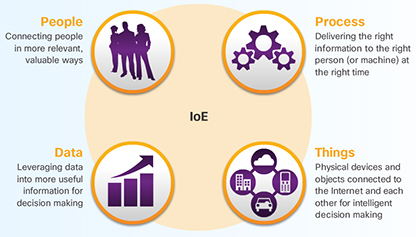
The idea of connecting things is not a new one. In fact, the internet of things (IoT) is a term that has been broadly accepted since the late 1990s. The IoT refers to the network of physical objects accessible through the internet.
Not all of the objects that connect to the IoT will be computing devices, but many will be. So, what is a computing device? While it may be easy to identify a desktop or a laptop computer, the line between what is and is not a computer can become blurred. Is a car a computing device? What about a watch or a television?
The first computing devices (computers) were huge, room-sized machines that took teams of people to build, manage and maintain. Today, they are exponentially faster and only a fraction of the size of their predecessors. For the purposes of this course, a computing device is an electronic machine that performs calculations based on a set of instructions and comprises three main components: a central processing unit (CPU), memory, and an input/output unit.
Based on the definition above, a digital watch is a computing device, but an analogue watch is not. The digital watch has a CPU to run its program, it has memory to store the program and other information, and it has an I/O device to allow user interaction (screen, display, buttons, sound alerts, etc.). Although the analogue watch has the I/O component, it lacks CPU and memory.
2.1.1 What are things?
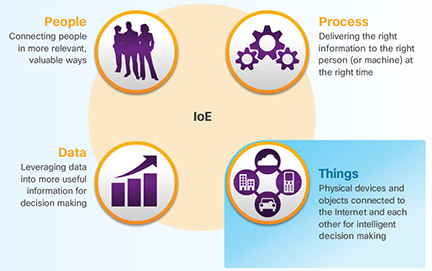
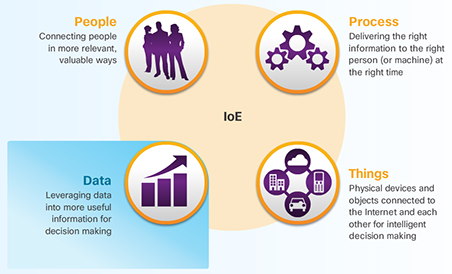
Currently, the things pillar, highlighted in Figure 2, comprises various types of traditional computers and computing devices, such as desktops, laptops, smartphones, tablets, mainframes, and computer clusters. However, the IoT will include all types of objects, including objects and devices that are not traditionally connected. In fact, Cisco estimates that 99 percent of physical objects will one day be connected.
These objects contain embedded technology to interact with internal servers and the external environment. These objects are network-capable, and can communicate across a secure, reliable and available network platform. However, the IoT refers to a single technology transition; the ability to connect objects that were previously unconnected so those objects can communicate across the network.
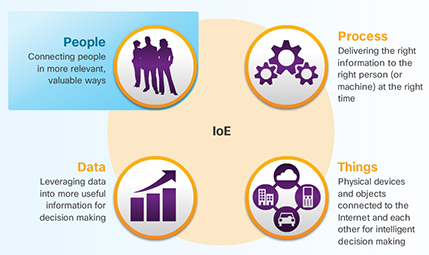
The availability of data, when objects can sense and communicate, has the capability of changing how and where decisions are made, who makes the decisions, and the processes that individuals and businesses use to make those decisions. The IoE is built on the connections among people, processes, data, and things. These are the four pillars of the IoE, as shown in the figure. However, the IoE is not about these four dimensions in isolation. Each amplifies the capabilities of the other three. It is in the intersection of all of these elements that the true power of the IoE is realised.
2.1.2 Common devices
The internet connects more computing devices than just desktop and laptop computers. There are devices all around that you may interact with on a daily basis that are also connected to the internet.
For example, people are using mobile devices more every day to communicate and accomplish daily tasks, such as checking the weather or online banking. The table below shows more about mobile devices.
In the future, many of the things in your home could also connect to the internet so that they can be monitored and configured remotely. Table 1 shows more about connected household devices.
There are also many connected devices found in the world outside your home that provide convenience and useful or even vital information. The table below shows more about these commonly found connected devices.
How many of these devices do you use on a daily basis?
| Smartphones | Tablets | Smartwatches | Google Glass |
| Smartphones are able to connect to the internet from almost anywhere. Smartphones combine the functions of many different products together, such as a telephone, camera, GPS receiver, media player, and touch screen computer. | Tablets, like smartphones, also have the functionality of multiple devices. With the additional screen size, they are ideal for watching videos and reading magazines or books. With on-screen keyboards, users are able to do many of the things they used to do on their laptop computer, such as composing emails or browsing the web. | A smartwatch can connect to a smartphone to provide the user with alerts and messages. Additional functions, such as heart rate monitoring and counting steps, like a pedometer, can help people who are wearing the device to track their health. | Google glass was an experimental wearable computer in the form of glasses with a tiny screen that displays information to the wearer in a similar fashion to the head-up display (HUD) of a fighter pilot. A small touch pad on the side allows the user to navigate menus while still being able to see through the Google glass. |
2.1.3 Connecting devices
For the IoE to function, all of the devices that are part of the intended IoE solution must be connected together so that they can communicate. There are two ways to connect devices: wired or wirelessly.
In most cases, connecting devices together using cables is too costly or cumbersome to be practical. For this reason, most devices will need to send and receive data wirelessly.
There are many different types of wireless communication. The most common types of wireless communication are Wi-Fi, Cellular, Bluetooth, and near field communication (NFC). Some devices, such as smartphones and tablets use a combination of wireless communication methods to connect to different devices.
Figure 3 details how a smartphone may connect to other types of devices. Click on each of the plus signs to interact with the image.
2.1.4 Electronics that are not on the internet
According to Internet World Stats, as of June 2012, statistical data indicates that there were approximately 2.4 billion users on the Internet. This is only 34% of the total world population.
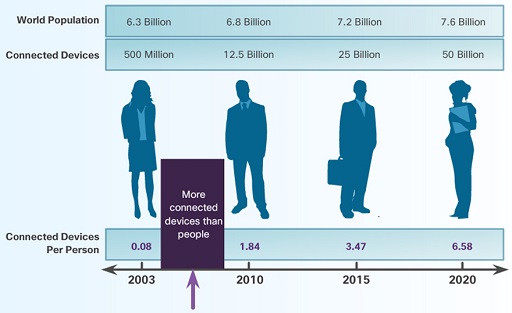
The number of connected devices on the internet in 2012 exceeded the world population. This includes traditional computing devices and mobile devices, as well as new industrial and consumer devices that we think of as 'things'.
Although, this may seem like a lot of devices on the internet, it represents less than 1% of the objects that could be connected. Some examples of devices that are currently unconnected could include microwaves, alarm clocks, and lighting systems.
2.1.5 Sensors
Sensors are one way to collect data from non-computers. They convert physical aspects of our environment into electrical signals that can be processed by computers. Some examples are soil moisture sensors, air temperature sensors, radiation sensors, and motion sensors. Sensors of all types will play an important role in connecting what has traditionally been unconnected in the IoE.
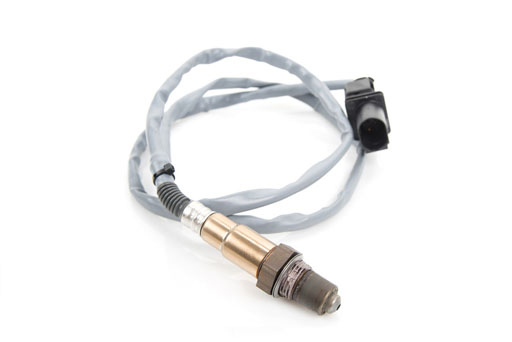
Figure 4 shows an oxygen sensor. These sensors are very common in cars equipped with electronic fuel injection and are used to monitor the amount of oxygen expelled by the engine after a cycle of fuel burn. Based on that information, the fuel injection computer is able to adjust the air-fuel mixture for optimal engine performance
2.1.6 RFID
A popular type of sensor uses radio frequency identification (RFID). RFID uses radio frequency electromagnetic fields to communicate information between small coded tags (RFID tags) and an RFID reader. Usually, RFID tags are used to identify and track what they are embedded into, such as a pet. Because the tags are small, they can be attached to virtually anything including clothing and cash. Some RFID tags carry no batteries. The energy required by the tag to transmit information is obtained from the electromagnetic signals that are sent by the RFID tag reader. The tag receives this signal and uses part of its energy to power the response.
The models shown in Figure 5 have a transmission range of a few meters, while other RFID tags are equipped with a battery and operate as a beacon that can broadcast information at all times. This type of RFID tag usually has a range of a few hundred meters. Unlike the bar code, RFID relies on radio-frequency; therefore, does not require line of sight to work.
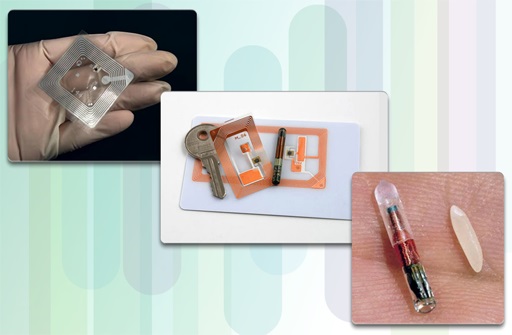
Because of its flexibility and low power requirements, RFID tags are a great way to connect a non-computer device to an IoE solution by providing information to an RFID reader device. For example, it is now common to find car factories attaching RFID tags to the car bodies. This allows for better tracking of that car throughout the assembly line.
The first generation of RFID tags is 'write once read many'. This means that they can be programmed in the factory once, but cannot be modified out in the field. Newer RFID tags are 'write many read many', with integrated circuits that can last 40 to 50 years and be written to over 100,000 times. These tags can effectively store an entire history of the asset to which they are attached, such as the date of manufacture, location tracking history, multiple service cycle, and ownership.
2.1.7 Controller
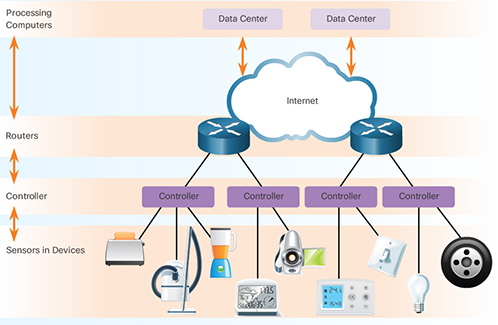
Sensors can be programmed to take measurements, translate that data into signals, and then send that data to a main device called the controller. The controller is responsible for collecting data from sensors and providing an internet connection. Controllers may have the ability to make immediate decisions or they may send data to a more powerful computer for analysis. This more powerful computer might be in the same LAN as the controller or might only be accessible through an internet connection.
In order to reach the internet and then the more powerful computers in the data centre shown in the figure, the controller will first send data to a local router. This router interfaces between the local network and internet and can forward data between them..
2.1.8 The IoT and the IoE
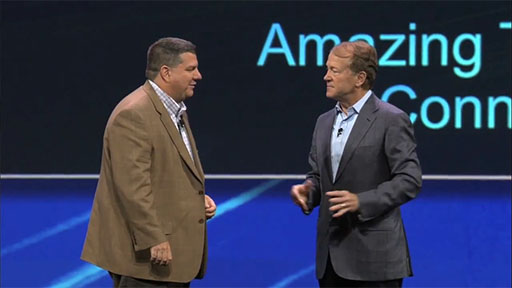
Transcript
In the video, Jim Grubb, Cisco's Chief Demonstration Officer, and John Chambers, Cisco’s former CEO, during the Cisco Live 2013 keynote demonstration, define the opportunity presented by the internet of things and how the internet of esverything will take advantage of these new opportunities.
The internet of everything is the networked connection of people, process, data and things.
In the video, the IoT is described as a market transition that is taking advantage of the reduced cost in connecting things to the Internet. As a result, the IoT implies a fundamental shift in the state of our present economy as we move towards connecting 50 billion devices by 2020.
However, the IoT is only one of several market transitions that are enabling the full potential of the IoE. For example, the following are transitions that are also enabling the IoE’s full potential:
- mobility − providing access to resources from any device, at any time, and from any place
- cloud computing − providing distributed computing resources and services over a network
- big data − as the volume of data being produced is accelerating, so too is our capacity to analyse and process it
- IPv6 − expanding the current internet address space by 3.4×10^38 addresses, easily accommodating 50 billion devices by 2020, and billions upon billions more.
The amount of value an organisation derives from IoE depends on its ability to capture transitions, such as cloud, mobility, and the IoT. For example, John highlights Smart Grid, a solution that realises the benefit of the IoE by improving energy efficiency on the electricity grid provided by utilities and where the energy is used in homes and offices.
IoT is about how to connect the unconnected, making things accessible by the internet. As it relates to IoT, IoE is addressing why we are connecting the unconnected.
2.2 Data as a pillar
Data is a key element of all computer systems – from early computing to current systems. A predominant reason for having computer systems, has been to process and transmit data. In this section, you will learn how this is accomplished and what systems are used to convert digital data into human understandable terms.
2.2.1 What is data?
Data is a value assigned to anything that is around us. Data is everywhere. However, by itself, data can be rather meaningless. As we interpret the data, for example, by correlating or comparing, it becomes more useful. This useful data is now information. As this information is applied or understood it then becomes knowledge.
In electronic communication, data is represented as 1s and 0s. These discrete elements are known as bits (or binary digits). All electronic data is stored in this digital binary format. Whereas humans interpret words and pictures, computers interpret bit patterns.
A number of website provide free tools so you can see how letters are translated into binary code. You can try this out.
The advantage of using digital coding is that it can be stored more efficiently and can be transmitted over long distances without the quality becoming degraded.
2.2.2 Management of data
Computers generally lack the contextual awareness and intuitiveness of humans. As a result it is important to consider the following two states of data: structured and unstructured.
Structured data
Structured data refers to data that is entered and maintained in fixed fields within a file or record. Structured data is easily entered, classified, queried, and analysed by a computer. For example, when you submit your name, address, and billing information to a website, you are creating structured data. The structure will force a certain format for entering the data to minimise errors and make it easier for a computer to interpret it. Figure 8 represents different types of data being stored in specified locations so that computer programs can then locate the data.
Unstructured data
Unstructured data lacks the organisation found in structured data. Unstructured data is raw data. It does not possess the scaffolding that identifies the value of the data. Unstructured data lacks a set way of entering or grouping the data, and then analysing the data. Examples of unstructured data include the content of photos, audio and video files.
Structured and unstructured data are valuable assets to individuals, organisations, industries, and governments. Like other assets, the information gathered from both structured and unstructured data has measurable value. However, the value of that data can increase or decrease depending on how that data is managed. Even the best data loses value over time.
It is important for organisations to take all forms of data (structured, unstructured, and semi-structured) and determine ways to format that data so it can be managed and analysed.
To understand the management of data, it is important to understand concepts such as data storage and the transportation of data.
2.2.3 Data storage
When referring to storage space, we use the term bytes (B). A single byte is a combination of 8 bits. Other measurements include:
- kilobytes (KB) − approximately one thousand (10^3) bytes
- megabytes (MB) − approximately one million (10^6) bytes
- gigabytes (GB) − approximately one billion (10^9) bytes
- terabytes (TB) − approximately one trillion (10^12) bytes
- petabytes (PB) − approximately one quadrillion (10^15) bytes
- exabytes (EB) − approximately one quintillion (10^18) bytes.
If you have never seen this symbol before ^ it is a common shorthand for a mathematical power. A power is a number that is multiplied by itself a number of times. For example 10 to the power of 2 (10^2) is 10*10 which is 100, again 10 to the power of 4 (10^4) is 10*10*10*10 or 10,000.
Over the years, the amount of available storage space has increased exponentially. For example, not long ago the storage space of hard drives was typically measured in megabytes. Today, terabyte hard drives are common.
There are three primary types of data storage:
- Local data refers to data that is accessed directly, by local devices. Hard disks, USB flash drives, and CDs/DVDs are examples of local data storage. See Table 3 for more information.
| Optical drives | USB flash drives | Hard drives | External hard drives |
| An optical drive is used to write data onto a CD or DVD. These portable storage devices are inexpensive and easy to label and store. | USB flash drives are removable and rewritable. These portable storage devices can hold gigabytes of data. | Hard drives come pre-installed on most desktop or laptop computers. These devices store data on magnetic platters. They can store large amounts of data, 1 terabyte or more. | External hard drives that are enclosed in a case and are usually attached to your computer via a USB or Firewire port. |
- Centralised data is stored and shared from a single centralised server. This information can be accessed remotely by multiple devices over the network or the internet. Using a centralised data server can result in bottlenecks and inefficiencies, and can become a single point of failure.
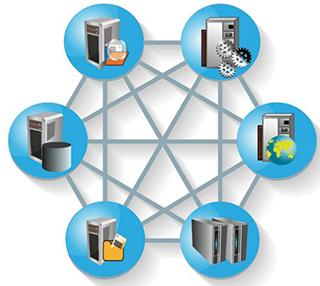
- Distributed data is managed by a central database management system (DBMS). Distributed data is data that is replicated and stored in multiple locations. This allows for easy and efficient sharing of data. Distributed data is accessed through the use of local and global applications. With a distributed system, there is no single source of failure. Should one site lose power, users are still able to access data from the other sites. See Figure 9.
2.2.4 Internet service providers
In centralised and distributed data storage environments, data must be transported over the network or internet.
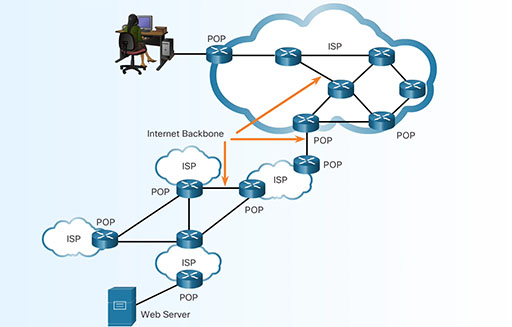
Devices that forward data across the internet must use an internet service provider (ISP). An ISP supplies the connections to allow internet access to individuals and businesses, and can also interconnect with other ISPs. Networks connect to an ISP at a point of presence (POP).
Within an ISP, a network of high-speed routers and switches move data between the various POPs. Multiple links interconnect the POPs to provide alternate routes for data in the event that one link fails or becomes overloaded with traffic.
To send information beyond the boundaries of an ISP network, packets are forwarded to other ISPs. As shown in the animation, the internet is made up of high-speed data links that interconnect multiple ISPs together. These interconnections are part of the very large, high-capacity network known as the internet backbone.
2.2.5 IP addressing
Packets that cross the internet must be internet protocol (IP) packets. Each IP packet must contain a valid source and destination IP address. Without valid address information, packets will not reach the destination host and return packets will not make it back to the original source. The IP protocol defines the structure of the source and destination IP addresses. It specifies how these addresses are used in routing of packets from one host or network to another.
Currently, the internet uses IPv4 (IP version 4), but is transitioning to IPv6 (IP version 6). IPv6 allows for greater access and scalability with more available IP addresses and other features.
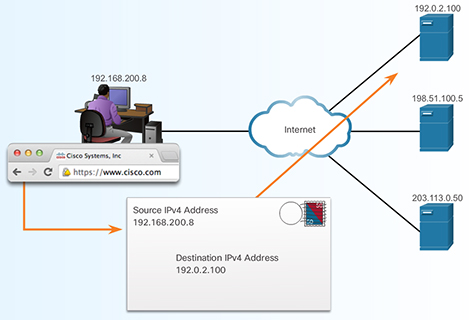
The IP address is similar to the mailing address of a person. It is known as a logical address because it is logically assigned based on the host location. This process is similar to the local government assigning a street address based on the logical description of the city, village, or neighborhood. It would be impossible to remember all of the IP addresses for all of the servers hosting services on the internet. Instead, there is an easier way to locate servers by associating a name with an IP address. In the figure, servers on the internet translate the name www.cisco.com to the IP address for the destination.
2.2.6 IP packets
Whether playing an internet video game, chatting with a friend, sending email, or searching the Web, the data being sent and received is carried in the form of IP packets. Before being sent on the internet, data is divided into IP packets. Packet size is between 64 to 1500 bytes for Ethernet networks. Downloading a single song that is 3 MB would require over 2000 packets of 1500 bytes each.
On networks, each byte of data is transmitted one bit at a time. Network bandwidth, or data transfer rate, is expressed in bits per second. For example, a one megabit (1,000,000 bits) connection means that data can be theoretically transmitted at one megabit per second (1 Mb/s).
2.2.7 IP address management
On the internet, each IP address must be unique. The Internet Assigned Numbers Authority (IANA) is responsible for controlling the distribution of IP addresses so that there is no duplication. IANA allocates blocks of IP addresses to one of five regional internet registries (RIRs). ISPs obtain blocks of IP addresses from the RIR in their geographic region. It is the responsibility of the ISPs to manage these addresses and assign them to customer networks and end users’ devices and networks.
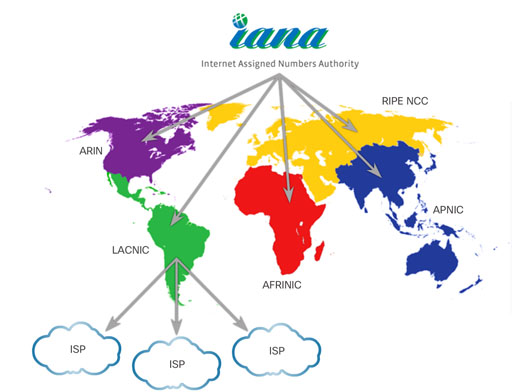
The ISP determines where to forward the traffic. Packets are passed from router to router, possibly through multiple ISP networks, until they reach their final destination. Routers in each of the ISPs use the destination address of the IP packets to choose the best path through the internet. The packet switching is transparent to the user, as they only see what was sent and received.
2.2.8 More connections equals more data
Why all the concern about data? Within the last decade, the volume of data that was produced in a year is now produced in a week. That amounts to over 20 exabytes of data produced a week. Data continues to grow exponentially as more of the unconnected become connected
2.2.9 Data in motion
Typically, data is viewed as information that has been collected over time. For example, it may have been collected through various transactions that represent an organisation’s order-processing. This data has value to the organisation and is historical in nature. This is static data that we call 'data at rest'.
However, as the accelerated growth for large quantities of data continues, much of this data's value is lost almost as quickly as it is created. Devices, sensors, and video deliver this growing source of new data on a constant basis. This data provides maximum value while it is interacting in real-time. We call this 'data in motion'.
This influx of new data opportunities is providing new paths to improve our world, from solving global health issues to improving education. There is incredible potential for intelligent solutions to collect, manage, and evaluate data at the speed of human communications. As a result, the internet of everything will increasingly become about 'data in motion'. Watch Cisco’s vision of bringing the evolution of data to the IoE.
Transcript
2.2.10 Managing big data
A driving factor of this growth of information is the number of devices connected to the internet, and the number of connections between those devices. But this is just the beginning. New devices are being connected to the internet daily, creating an abundance of new content.
With this amount of information, organisations must learn how to manage data and also, how to manage 'big data'.
There are three primary dimensions of big data that must be accounted for: volume, variety, and velocity.
Volume describes the amount of data being transported and stored. Variety describes the type of data it is. Velocity describes the rate at which this data is moving. Data cannot move without infrastructure. The swiftness of infrastructure (input/output, bandwidth, and latency) and the ability to rapidly enable optimal resources (network, CPU, memory and storage) directly affects the velocity of data.
2.2.11 Big data analytics
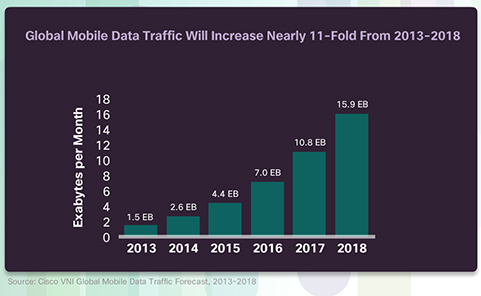
Big data applications receive information from a wide array of data sources, including PCs, smartphones, tablets, machines, sensors, social media, and multimedia applications. Much of this growth in data is due to mobile devices, as shown in the figure. Mobility enables anytime, anywhere, any device, and any content-user engagement.
Big data refers to the way in which organisations collect and analyse vast stores of data for insights that can help identify trends, predict behaviour, and empower decision makers. It considers:
- how much data is generated
- how this data is identified and managed as an asset to the organisation
- how this data is turned into usable information
- how organisations use this data to make decisions.
Ask yourself, what happens when we share information or an opinion about a business on a social network? How is this information propagated? Who gets this information? And more importantly, how are businesses reacting and using this information to create new customer connections?
2.2.12 Big data analytics (cont.)
Transcript
Big data applications must be able to gather this data and structure it in a way that can create value for organisations. For example, big data applications must account for changing data sources and trends, such as:
- mobility − mobile devices, events, sharing, and sensor integration
- data access and consumption − internet, interconnected systems, social networking, and access models
- ecosystem capabilities − major changes in the information processing model and the availability of an open source framework
As a result, the cost and complexity of these models has increased, prompting changes in the way big data is stored, analysed, and accessed. Organisations must adjust their current data models to accommodate big data. As a result, organisations are increasingly using virtualisation and cloud computing to support their big data needs.
2.2.13 Virtualisation
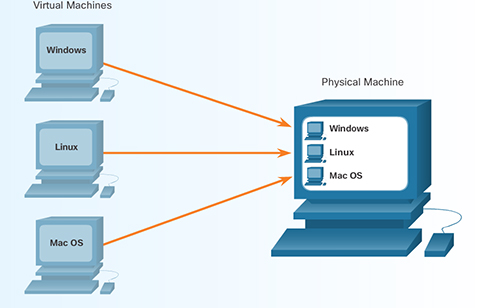
Historically, each computer has its own operating system, applications, and dedicated hardware components. Now, using software emulation, several virtual computers can run on a single physical computer. This means each virtual computer has its own operating system, applications, and dedicated hardware components. This is known as virtualisation in computing. Each virtual machine, shown in the figure, operates independently.
In the corporate world, a single physical infrastructure can run multiple virtual infrastructures. By virtualising the servers and networks, companies can reduce operational and administrative costs. The operational savings can come from the reduction in power and cooling requirements and the number of physical machines. A virtual server can be added to support additional applications.
You can also use virtualisation for your personal computing needs. You can try a new operating system on your computer without damaging your current system. You can browse the internet safely with your virtual machine. The virtual machine can be deleted if anything goes wrong.
2.2.14 Cloud computing
Cloud computing is another way to manage, store, and access data.
Cloud computing involves large numbers of computers connected through a network. Cloud computing providers rely heavily on virtualisation to deliver their services. It can also reduce the operational costs by using resources more efficiently. These companies provide four distinct categories of services. The table below outlines each category in more detail
| SaaS | PaaS | IaaS | ITaas |
| Software as a Service: Applications delivered over the web to the end users. | Platform as a Service: Tools and services used to deliver the applications. | Infastructure as a Service: Hardware and software to the power servers, storage, networks and operating systems. | IT as a Service: IT professionals support applications, platforms and infastructure. |
Cloud computing allows the users to access their data anywhere and at any time. You are probably already using some form of Cloud computing if you use web-based email services.
Cloud computing also enables organisations to streamline their IT operations by subscribing only to needed services. By using Cloud computing, the organisations may also eliminate the need for onsite IT equipment, maintenance, and management. Cloud computing reduces costs for organisations. It reduces equipment costs, energy costs, physical plant requirements, and support personnel training needs.
2.2.15 Data centres
Data centres are a critical enabler of cloud computing. A data centre is a facility that provides the necessary services to host the largest computing environments in existence today. Its main function is to provide business continuity by keeping the computing services available because most organisations are dependent on their IT operations.
To provide the necessary level of service, several factors must be considered in a data centre deployment:
- Location – Data centres should be located where there is reduced risk of natural disasters and sufficiently distanced from areas with high traffic of people (e.g. airports, malls, etc.) and areas of strategic importance to governments and utilities (e.g. refineries, dams, nuclear reactors, etc.)
- Security – A data centre should extend tight controls over physical access and on-site personnel.
- Electrical – There should be sufficient access to electrical power with backup power consisting of uninterruptible power supplies, battery banks, and electrical generators.
- Environmental – A tightly controlled physical environment that maintains appropriate temperature and humidity. It should also include sophisticated fire suppression systems.
- Network – The network infrastructure should be scalable and reliable with redundant connectivity.
Currently, there are over 3000 data centres in the world that offer general hosting services (IaaS) to individuals and organisations. There are many more data centres that are owned and operated by private industries for their own use.
Watch the Youtube video for more information and a detailed tour of the Cisco Data Center in Allen, Texas.
2.2.16 Clouds
Cloud computing uses a shared pool of computing resources (e.g., networks, servers, storage, applications, and services) to provide on-demand network access. Using virtualisation in data centre environments, Cloud computing can be rapidly scaled with minimal management and effort.
The National Institute of Standards and Technology (NIST) has defined four types of cloud deployment models:
- private
- public
- community
- hybrid.
A private cloud is created exclusively for a single organisation. The infrastructure could be physically located on or off site, and may be owned by a separate provider. The private cloud provides services only to members of the single organisation.
A public cloud is created for use by the general public. The infrastructure is physically located on the provider’s site, but may be owned by one or multiple organisations that could include businesses, academic institutions, or governments.
A community cloud is created for exclusive use by a specific community. The community consists of multiple organisations that have shared concerns (e.g., mission, security requirements, policy, and compliance considerations). The infrastructure could be physically located on or off site, and may be owned by a separate provider or by one or more of the organisations in the community. The differences between public clouds and community clouds are the functional needs that have been customised for the community. For example, healthcare organisations must remain compliant with policies and laws (e.g., HIPAA) that require special authentication and confidentiality. Organisations can share the implementation effort of these requirements across a common cloud deployment.
A hybrid cloud infrastructure is a composition of two or more distinct cloud infrastructures (private, community, or public) that are unique entities. These entities are bound together by technology that enables data and application portability. This portability allows an organisation to maintain a single perspective of a cloud solution while taking advantage of the strengths available from different cloud providers. For example, geography (location to end users), bandwidth, policy or law requirements, security, and cost are all features that may differentiate providers. A hybrid cloud offers the flexibility to adjust and react to these provider services, on demand.
2.2.17 Three critical cloud conversations
Cloud computing has already helped organisations make significant changes to their infrastructures. This process will become more pervasive as organisations take advantage of the IoE and assess big data needs. Organisations must leverage a variety of clouds. They will need an infrastructure and IT staff able to blend those clouds, and they will need to determine which cloud model might be best for each service.
| The IoE requires a variety of cloud models | All cloud models must work together seamlessly | Enterprises must keep their options open |
Organisations need maximum flexibility to efficiently and reliably connect people and things:
| When selecting cloud solution providers, integration and consistency across all models is a critical factor. Cloud solution providers must offer:
| The IoE is an evolving marketplace and organisations must evolve with it. Choice is critical Avoid getting locked in to one provider or one methodology. Need expert advice to capitalise on the evolution of the cloud. |
Organisations need a flexible infrastructure that:
|
2.2.18 Lab: install a Linux virtual machine (optional)
Virtualisation is a critical factor in cloud computing and data centres. You can experience virtualisation on your own PC by installing a virtual computer.
Virtual computers that run within a physical computer system are called virtual machines. Today, entire computer networks are virtualised. Anyone with a modern computer and operating system has the ability to run virtual machines from the desktop.
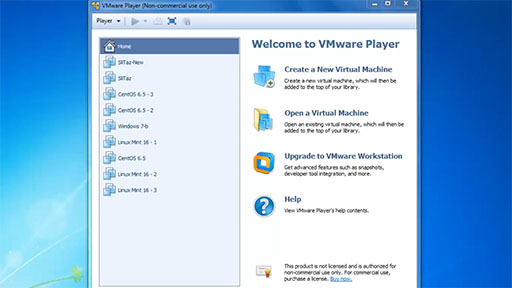
Watch a demonstration of installing a Linux virtual machine.
Transcript
The video demonstration shows how to complete this activity. After viewing the video, you can download the Lab – Install a Linux Virtual Machine (Optional) document to investigate the activity on your own.
Please be aware that virtualisation and running a Linux Virtual Machine will not work on all computers and devices being used to read this course. This optional activity is designed for desktop virtualisation using a personal computer. Another challenge you must be aware of before you commence is that virtualisation requires extra computer system memory which your own system may not have. If you have at least 2Gb (gigabytes) of memory (RAM) available this activity will work.
An alternative solution, if you have sufficient bandwidth on your internet connection, is to use SuseStudio. While this is advanced, it does allow you to run a remote Linux desktop system.
Another alternative is to use the web browser friendly demo version of Linux Unhatched from NDG who also work in partnership with Cisco Systems. You will need to sign in and you will be able to use Linux on any HTML5 compatible browser. This is unique as it is running on cloud based virtualisation.
2.3 People as a pillar
The reality is that we are all connected (like it or not) − the chances are as you are reading this course you may be connected to others via email, text (SMS) or social media. In this section you will learn about:how information adapts the way we behave, how (and why) businesses use data and the essential collaborative nature of the internet.
2.3.1 People must be connected
Data alone serves no purpose. A large amount of data which no one can access, serves no one. Organising that data and transforming it into useable information enables people to make better-informed decisions and take appropriate actions. This creates economic value in an economy that is enabled by the internet of everything.
This is why people is one of the four pillars. People are a central figure to any economic system. People interact as producers and consumers where the intent is to improve well-being by satisfying human needs. Whether the connections are people-to-people (P2P), machine-to-people (M2P), or machine-to-machine (M2M), all connections, and the data generated from those connections, are used to enhance the value for people.
The internet is teeming with data. Having access to the data and then taking action based upon the knowledge gained from this information is what the IoE is all about. For example, when Jack Andraka was a 15 year old high school student, he accessed information on the internet to develop a test that could detect pancreatic cancer at a much earlier stage when chances for survival are significantly better.
What would you do to make your world a better place?
2.3.2 Information transforms behaviour
This [the IoE] is not about technology at all. It’s about how we change people’s lives.
Value is a measure of benefit in an economic system. It is people who determine the value of offerings through a system of exchange. It is important to highlight that while data and analytics matter, it is judgement from people that turns data into insights, and insights into IoE value.
The IoE enables accurate and timely information that can result in changing human behaviour for the benefit of all people. It facilitates feedback that allows people to make informed decisions that bridge the differences between actual outputs and desired outputs. This is known as a feedback loop. A feedback loop can provide real-time information based on current behaviour, and then deliver actionable information to modify that behaviour.
2.3.3 How businesses use data
The feedback loop is an important asset to businesses because it helps them react and plan in a constantly changing business landscape. It allows a business to have relevant and competitive offerings that address customer needs. For example, many retailers use loyalty cards to track customer purchases and identify trends. This enables retailers to promote offerings directly to the most relevant shoppers that represent the greatest potential for profit.
A hundred years ago businesses were focused on creating undifferentiated products, selling the same product to everyone. This was aligned with the evolution of mass production during the same time period. Equally aligned were promotional strategies for products, mass marketing using signage, pamphlets, and newspapers in hopes that people would buy the product.
However, a single business product or service is not likely to be needed by every person. A modern business is aware of targeted marketing that creates differentiated offerings based on customer needs. This is why businesses need access to customer data.
Micromarketing example
Target marketing is aimed at a specific group of people, separate from the market as a whole. This market may be based upon people who live in the same region, or have the same job title, or make a certain amount of money.
For instance, consumer data can show that a particular television programme is viewed most by people aged 40 to 65 with an annual household income of $250,000 or more. These programmes often run commercials for high-end cars because the car companies have access to the viewer data. They will pay for their commercials to run when their target market is most likely to see them.
Micromarketing is an even more precise version of marketing. E-commerce sites and loyalty programmes allow businesses to know more precisely what kind of product or service you may require.
For example, you may receive an email from an online site where you have purchased (or even browsed) before. This email may let you know about a sale on an item that is similar to something you have purchased in the past. Additionally, while browsing the web, you may notice an ad for the exact pair of shoes you were looking at online yesterday. This is not a coincidence.
Collaboration
It is through inclusive practices that enable people to contribute and collaborate effectively that better decisions will be made to maximise value. In fact, better collaboration within organisations is an area that will benefit most from the IoE. Collaboration will facilitate innovative new offerings that realise the potential of the IoE.
Collaboration in the IoE will make organisations more aware of customer needs and opportunities. Customers will be able to solve problems and get advice when and where it’s most convenient for them. Organisations will have new sources of information as people connect using data, voice, video, and social media.
Organisations using collaboration technologies will be able to predict and proactively resolve problems. They will be able to leverage social media to identify potential problems and resolve them before they become a serious issue. They will be able to identify and connect to the right expert at the right time. The expertise of highly-trained and knowledgeable employees will be more easily scaled across multiple locations.
With these collaboration technologies, businesses will experience the increased innovation and agility that will drive their growth. Organisations will be able to foster better relationships between employees who provide creative approaches to offerings, solutions, and processes. They will also be better able to connect decision makers, regardless of location, so that new innovations can be realised sooner.
2.4 Process as a pillar
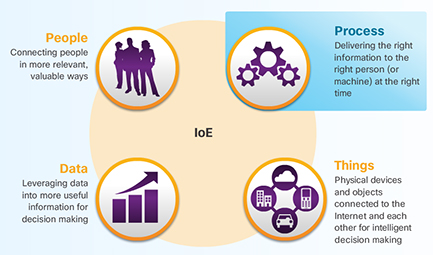
The fourth pillar is process. Processes play an important role in how the other pillars of things, data, and people work with each other to deliver value in the connected world of IoE.
The internet has revolutionised the way businesses manage their supply chains and the way consumers shop. Soon we will have visibility into processes we could never see before. This will provide opportunities to make these interactions faster and simpler.
With the correct process, connections become relevant and add value because the right information is delivered to the right person, at the right time, in the appropriate way.
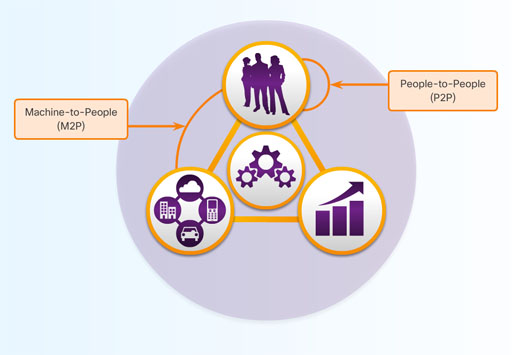
Processes are facilitating interactions between people, things, and data. Today, the IoE brings them all together by combining machine-to-machine (M2M), machine-to-people (M2P), and people-to-people (P2P) connections, as shown in Figure 18.
2.4.1 M2M connections
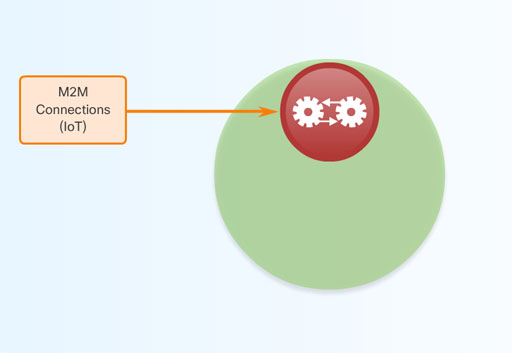
Machine-to-machine (M2M) connections occur when data is transferred from one machine or 'thing' to another over a network. Machines include sensors, robots, computers, and mobile devices. These M2M connections are often called the internet of things.
An example of M2M is a connected automobile that is signaling that a driver is almost home, which prompts the home network to adjust the home temperature and lighting.
2.4.2 M2P connections
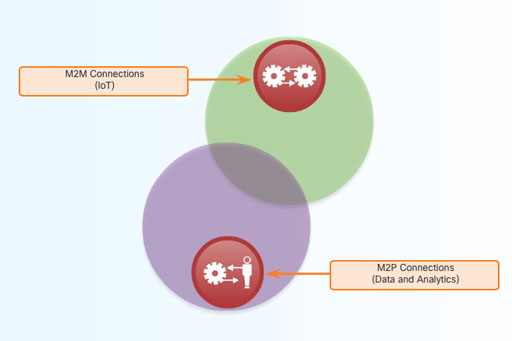
Machine-to-people (M2P) connections occur when information is transferred between a machine (such as a computer, mobile device, or digital sign) and a person, as shown in Figure 20. Whether a person gets information from a database, or conducts a complex analysis, this is an M2P connection. These M2P connections facilitate the movement, manipulation, and reporting of data from machines to help people make informed judgments. The actions that people take based on their informed judgments complete an IoE feedback loop.
Watch the video of examples of M2P connections.

Transcript
2.4.3 P2P connections
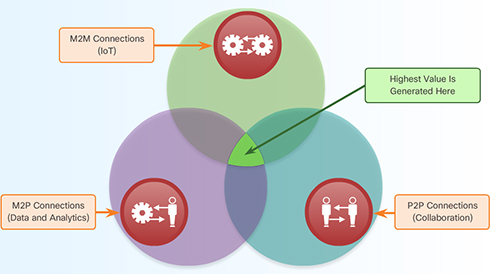
People-to-People (P2P) connections occur when information is transferred from one person to another. Increasingly, P2P connections happen through video, mobile devices, and social networks. These P2P connections are often called Collaboration.
As shown in the figure, the highest value of the IoE is realised when process facilitates the integration of M2M, M2P, and P2P connections.
2.4.4 Property management case study
In what ways can the combination of people, process, data, and things across a secure platform create value? Consider property management and owners, as shown in the Table 6.
| Connection type | Value of combined connections |
| 95,000 sensors and devices connected to Cisco network, including fire alarms, wireless access points, video surveillance cameras, temperature sensors, and HVAC | Cut energy costs 21% in 2012, another 11% in 2013 |
Data from sensors and devices monitored by building managers with mobile devices Energy consumption analysed in real time to increase efficiency, optimise usage | Providing network connectivity to tenants |
| Mobile employees work with tenants and respond to service request in real time via mobile devices | Plans to offer integrated unified communications (UC), wireless, physical security services |
In a commercial real estate market, a property management company must look for ways to differentiate itself from its competitors by providing unique services to tenants and increasing revenues along the way.
In one example, a property management company installed 95,000 sensors throughout the building on a Cisco network to track energy usage. By applying analytics applications, the company was able to track energy usage and help tenants lower their energy bills. This company also provided their building managers and other facilities employees with mobile devices to improve collaboration and service to tenants.
The result was a 21% reduction in energy costs in 2012.
2.4.5 Timely and relevant information
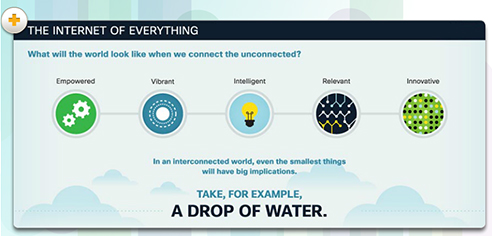
The billions of M2M, M2P, and P2P connections make possible the 'everything' in the IoE. The process pillar leverages the connections between data, things, and people to deliver the right information, to the right thing or person, at the right time. It is these billions of connections that add value.
A drop of water is a great metaphor for the IoE. A single drop by itself is not that significant. Yet, when combined with millions or even billions of other drops, it can change the face of our planet. Like a single drop of water, a single person, bit of data, or thing connected with billions of other people, data, and things can shape the face of our planet.
To convert our metaphor into a 'real-world' IoE example, consider how one tiny drop of water can begin a chain reaction that causes a big result. Monitoring systems send alerts of a sudden thundershower. Sensors talk to networks. Networks talk to traffic grids. Traffic grids talk to energy systems. All these work in concert to protect people and preserve their quality of life.
A drop of water
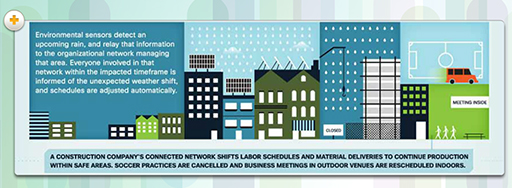
Environmental sensors detect an upcoming rain, and relay that information to the organisational network managing that area. Everyone involved in that network within the impacted timeframe is informed of the unexpected weather shift, and schedules are adjusted automatically.
A construction company's connected network shifts labour schedules and material deliveries to continue production within safe areas. soccer practices are cancelled and business meetings in outdoor venues are rescheduled indoors
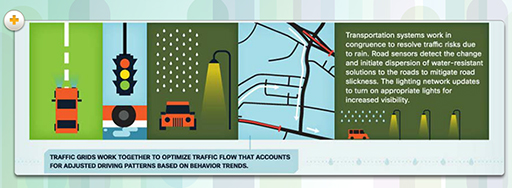
Transportation systems work in congruence to resolve traffic risks due to rain. Road sensors detect the change and initiate dispersion of water-resistant solutions to the roads to mitigate road slickness. The lighting network updates to turn on appropriate lights for increased visibility.
Traffic grids work together to optimise traffic flow that accounts for adjusted driving patterns based on behaviour trends.
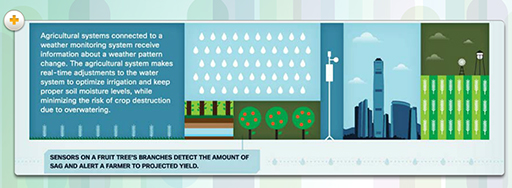
Agricultural systems connected to a weather monitoring system receive information about a weather pattern change. The agricultural system makes real-time adjustments to the water system to optimise irrigation and keep proper soil moisture levels, while minimising the risk of crop destruction due to overwatering.
Sensors on a fruit tree's branches detect the amount of sag and alert a farmer to projected yield.
The internet of everything will enhance our lives tremendously, as even one unassuming element will have sweeping implications for business, social interactions, and well-being in general. Amazing things will happen, and amazing experiences will be created.
2.5 Terms and concepts practice
This activity will help you to test some of the terms and concepts you've been introduced to.
Two lists follow, match one item from the first with one item from the second. Each item can only be matched once. There are 9 items in each list.
ISP
IANA
data velocity
virtualisation
cloud computing
M2M
feedback loop
RFID tag
big data
Match each of the previous list items with an item from the following list:
a.the organisation that oversees the assignment of internet addresses
b.allows people to make informed decisions that bridge the differences between actual outputs and desired outputs
c.things communicating with other devices
d.internet service provider
e.an active or passive device that provides identification information when in the presence of a reader device
f.uses shared virtualised computing and network resources to deliver IT services across the internet
g.refers to the way in which organisations collect and analyse vast stores of data for insights that identify trends, predict behaviour, and empower decision makers
h.allows a computer to run multiple operating systems and programs at the same time
i.the rate at which data moves on the network infrastructure
- 1 = d,
- 2 = a,
- 3 = i,
- 4 = h,
- 5 = f,
- 6 = c,
- 7 = b,
- 8 = e,
- 9 = g
2.6 Session 2 quiz
Check what you have learned in Session 2.
Use 'ctrl' (cmd on a Mac) or right-click to open the quiz in a new window or tab then come back here when you're finished.
2.7 Summary
The four pillars of the IoE are People, Process, Data, and Things.
Things
For the IoE to function, all of the devices that are part of the intended IoE solution must be connected together so that they can communicate. There are two ways in which devices can be connected; either wired or wirelessly. Devices that are not traditionally connected to the network require sensors, RFIDs, and controllers.
Data
Big Data refers to the vast amount of data generated every hour by billions of connected devices. Big Data requires new products and techniques to manage, store, and analyse it. Part of the solution to the problem of Big Data is virtualisation and Cloud computing.
Big Data refers to the way in which organisations collect and analyse vast stores of data for insights that can help identify trends, predict behaviour, and empower decision makers.
People
Connected people make behavioural transformations based on their access to information. Simultaneously, their changed behaviour affects the information that is generated. This is known as a feedback loop. Organisations use data generated by connected people to refine and target their marketing strategies.
Process
Processes occur between people, things, and data. Today, the IoE brings them all together by combining M2M, M2P, and P2P connections.
Acknowledgements
The Internet of everything free course is brought to you by The Open University. This course was originally developed by Cisco Systems Ltd and adapted for OpenLearn by The Open University. The collaboration of The Open University and Cisco Systems to develop and deliver this course as part of OpenLearn’s portfolio will provide and extend free learning in this important and current area of study.
Except for third party materials and otherwise stated (see terms and conditions), this content is made available under a Creative Commons Attribution-NonCommercial-ShareAlike 4.0 Licence.
The material acknowledged below is Proprietary and used under licence (not subject to Creative Commons Licence). Grateful acknowledgement is made to the following sources for permission to reproduce material in this course:
Videos: © Cisco Systems http://www.cisco.com/ https://creativecommons.org/ licenses/ by-nc-nd/ 4.0/
Every effort has been made to contact copyright owners. If any have been inadvertently overlooked, the publishers will be pleased to make the necessary arrangements at the first opportunity.
Don't miss out
If reading this text has inspired you to learn more, you may be interested in joining the millions of people who discover our free learning resources and qualifications by visiting The Open University – www.open.edu/ openlearn/ free-courses.