Week 1: Threat landscape
Use 'Print preview' to check the number of pages and printer settings.
Print functionality varies between browsers.
Printable page generated Sunday, 4 October 2026, 7:49 AM
Week 1: Threat landscape
Introduction
Introduction

Transcript
Welcome to this free course, Introduction to cyber security: stay safe online.
Cory Doctorow is your guide through this course. He is a visiting professor at The Open University. He’ll meet you at the start of each week to let you know what’s coming up and remind you of what you’ve learned so far to help you make the most of your learning.
About the course
Your journey into the world of cyber security and protecting your digital life has been organised into eight weeks of study. The first three weeks focus on understanding the basics of cyber security. This includes an exploration of the security threat landscape, together with some of the basic techniques for protecting your computers and your online information.
You’ll then look ‘under the hood’, exploring some of the technologies that underpin the internet and cyber security. This will include gaining an understanding of how computers are connected in a network and how the data transmitted across that network is kept secure.
In the final two weeks of the course, you’ll look at what can be done if you suffer a successful cyber security attack and how to develop an action plan. As part of this, you’ll learn about both the legal and technical aspects of recovering from an attack.
This course will not only help you take steps to protect yourself online, such as how to create a strong password, but also provide an overview of cyber security from the security threat landscape to how the internet works. It will also provide a foundation for further study of this important discipline.
To test your knowledge you can try the end-of-week practice and end-of-course compulsory badge quizzes.
The Open University would really appreciate a few minutes of your time to tell us about yourself and your expectations for the course before you begin, in our optional start-of-course survey. Participation will be completely confidential and we will not pass on your details to others.
1 Online, the new frontline

Transcript
We shop online. We work online. We play online. We live online. More and more, our lives depend on online, digital services. Almost everything can be done online – from shopping and banking to socialising and card making – and all of this makes the internet, also known as cyberspace, an attractive target for criminals.
Large-scale cyber security breaches often make the headlines but about 70% of organisations are keeping their worst security incidents under wraps, so what makes the news is just a small proportion of the breaches that are actually taking place. Computers and their users in Britain are being targeted by many thousands of cyber attacks every hour.
We all have a responsibility to protect services from being maliciously disrupted or misused, through our vigilance, through our own security measures and through reporting events when they arise.
The knowledge, tools and best practices relating to protecting the computers, communications networks, programs and data that make our digital lives possible are collectively referred to as cyber security, or information security. For the purposes of this course, we use the two terms interchangeably.
Behind the numbers
Cyber security is definitely one of those areas where you need to evaluate the validity of any information you find online before accepting it. The UK government regularly publishes surveys of cyber security breaches. In 2019, 32% of businesses identified cyber security breaches or attacks in the previous 12 months. Medium (over 50 employees) and large businesses (over 250 employees) were particularly at risk with 60% reporting attacks. The report also notes that attacks may be under reported and the true cost and impact of cyber security breaches may be undervalued. It also notes that some businesses may not be aware that they have been attacked (Department for Digital, Culture, Media and Sport, 2019).
By far the largest number of attacks reported are fraudulent emails, or fraudulent websites. Phishing attacks have resulted in the most disruptive and expensive breaches in the past 12 months. Specialist security firms also publish regular reports on the current cyber security situation. TrendMicro reports blocking 26,804,076,261 threats in the first half of 2019 (TrendMicro, 2019). Again, the largest proportion contained in emails. Sophos also reports spam emails as the biggest source of attacks and warns that ransomware is increasing and can be the most destructive (Sophos, 2019).
Statista is a business that focuses on collecting and presenting statistics on a huge variety of subjects. Some of these reports are free of charge. For example, it reports that over 446.5 million records were exposed by data breaches in the United States in 2018 (Statista, 2018).
Let’s get started by learning some of the basic terminology used when discussing cyber security.
1.1 Talking security: the basics

In any discussion of security, there are some basic terms that will be used a lot. This section will introduce you to the basic terminology of information security.
CIA
The guiding principles behind information security are summed up in the acronym CIA (and we’re pretty sure there’s a joke in there somewhere), standing for confidentiality, integrity and availability.
We want our information to:
- be read by only the right people (confidentiality)
- only be changed by authorised people or processes (integrity)
- be available to read and use whenever we want (availability).
It is important to be able to distinguish between these three aspects of security. So let’s look at an example.
Case study: Equifax, credit reporting company
In September 2017, Equifax reported a data breach in which the records of 147 million people had been exposed. This mostly affected people in the US, but 693,665 people in the UK also had their data exposed. Equifax UK later wrote letters to each of these people explaining the situation.
The exposed data contained millions of names and dates of birth, Social Security numbers, physical addresses, and other personal information that could lead to identity theft and fraud. Equifax had a system to monitor network traffic, but it hadn’t worked for the previous 19 months because a security certificate hadn’t been renewed.
Equifax stored its data in a database called ACIS, and was alerted in March 2017 to a critical security vulnerability in an Apache Struts web server that provided access to this database. A patch had been issued but Equifax failed to ensure that the patch was installed. Hackers exploited this vulnerability until the missing certificate was installed at the end of July 2017.
In May 2019, the data breach was thought to have cost Equifax $1,400,000,000.
In July 2019, Equifax agreed a settlement with The Federal Trade Commission (US) of over $575,000,000 (perhaps up to $700,000,000) with a free monitoring and identity theft service for up to 10 years.
So how do the principles of CIA apply to the Equifax case? Quite obviously, confidentiality was violated: unauthorised people could read the data. However, authorised users still had full access to the data, so it remained available; and the data was not changed, so its integrity was preserved.
Information assets
Time for another definition. When talking about valuable data we use the term ‘information assets’. In the Equifax case, the information assets were the data about people and their financial records collected by Equifax.
When we consider security of online communications and services, we also need two additional concepts: ‘authentication’ and ‘non-repudiation’.
When we receive a message, we want to be confident that it really came from the person we think it came from. Similarly, before an online service allows a user to access their data, it is necessary to verify the identity of the user. This is known as authentication.
Non-repudiation is about ensuring that users cannot deny knowledge of sending a message or performing some online activity at some later point in time. For example, in an online banking system the user cannot be allowed to claim that they didn’t send a payment to a recipient after the bank has transferred the funds to the recipient’s account.
Malware
Finally, there are a number of terms associated with software that attempts to harm computers in different ways. Collectively these are known as ‘malware’ (a contraction of malicious software).
Depending on what the malware does, different terms are used to in relation to malware. For example:
- ransomware is malware that demands payment in order to refrain from doing some harmful action or to undo the effects of the harmful action
- spyware records the activities of the user, such as the passwords they type into the computer, and transmits this information to the person who wrote the malware
- botnets are created using malware that allows an attacker to control a group of computers and use them to gather personal information or launch attacks against others, such as for sending spam emails or flooding a website with so many requests for content that the server cannot cope, called a denial-of-service attack.
You’ll learn more about malware in Week 3.
Now that you understand some of the basic concepts and terminology, you’ll use this knowledge to study real examples of cyber security breaches.
1.2 Obtaining Sophos Threatsaurus

There are lots of technical terms relating to cyber security and it can be difficult to keep track of what’s what.
Sophos is one of the major players in the anti-malware business. They publish a Threatsaurus to help you remember and define the terms relating to malware. The Threatsaurus is a plain-English guide, to help IT managers and end users understand the threats posed by malicious software. The Threatsaurus includes:
- an A–Z glossary on computer and data security threats
- practical tips to stay safe from email scams, identity theft, malware and other threats
- a guide to Sophos’s security software and hardware.
Download the Sophos Threatsaurus PDF from https://ugc.futurelearn.com/ uploads/ files/ 3f/ d3/ 3fd36a66-d941-4595-b587-1a7b41998ae9/ Week_3_Sophos_Threatsaurus_AZ.pdf.
We have provided the complete web address for this file, so that you can easily check that the link points to a trustworthy site – in this case futurelearn.com. In general, before clicking on any link you should develop the habit of checking the address that it points to. This can be done by hovering your mouse pointer over the link and checking the status bar of your browser. On a mobile or tablet device, touching and holding the link will usually bring up a dialog box showing the complete link and some options of how to open it.
Save it so that you can refer to it throughout the course. You’ll use it again in Week 3.
1.3 Cyber security attacks and phishing
Transcript
Britain is being targeted by many thousands of cyber attacks every hour. For small organisations the worst breaches cost between £65,000 and £115,000 on average and for large organisations may run to many millions of pounds. These costs can occur as direct financial losses due to fraud or theft; the loss of productivity due to time spent recovering from the effects of a successful attack; or the lost of trust and reputation.
Phishing
It may be surprising that many cyber security breaches do not result from technical failures. In fact, it is commonplace for attackers to exploit the goodwill and trust of people to gain access to systems, using a form of attack that is known as ‘social engineering’. Pretending to be technical support personnel or crafting emails that ask for usernames and passwords are common forms of social engineering attacks. You may have heard the term ‘phishing’ used to describe these kinds of emails. Phishing is a form of social engineering. In the video, course guide Cory explains how it happened to him.
Phishing emails can use your real details and passwords to make you think that the attacker is a real contact that you already know, or to make you think that they have more information than they actually do to panic you into clicking on a message. The criminals get your email address and password data etc. from breaches of many online databases.
In October 2019, over 30,000 aggressive phishing emails an hour were being sent out to email addresses where a password was known: https://www.bbc.co.uk/ news/ technology-50065713
In January 2019, Troy Hunt, a security professional, published details of a database being used by criminals that contained 773 million records and over 21 million unique passwords.
To check if your account has been part of a data breach that included your email address visit https://haveibeenpwned.com. To check if a password that you use has also been found in a data breach visit https://haveibeenpwned.com/ Passwords. Don’t type in a complete password to start with. Type in the first few characters and click ‘pwned?’ If it doesn’t come up, your password is safe. If it does get a match, add the next character and check again. If you have typed in the complete password and get a match it is time to change your password!
Of interest, check the password 123456789. How many times has that been seen?!
In a later week in the course you’ll study how to create secure passwords.
In the next section you’ll find out about three high profile cyber security breaches.
1.4 Examples of high profile cyber security breaches

Cyber security attacks take many forms from obtaining users’ personal information, to attacking critical national infrastructure and obtaining companies’ proprietary data. Here we describe four high profile cyber security breaches which caused major financial losses and damaged the reputations of the organisations concerned.
Attacking online identities
Adobe Systems is one of the more important companies in the digital economy. Its software is used to produce, publish and present an enormous amount of material – chances are your favourite magazines and books were laid out with Adobe software.
Over the years, Adobe had stored the names, addresses and credit card information of tens of millions of users on its servers. Then, in October 2013, Adobe admitted that data from 2.9 million accounts had been stolen. Later, that number was revised to 38 million accounts, but when the data file was found on the internet it contained no less than 153 million user accounts. Much of this data could be read and soon copies of the stolen accounts were in wide circulation. It also became clear that the people who had stolen user data had also gained access to Adobe’s development servers – program code, potentially worth billions of dollars, had also been stolen.
Adobe was forced to change the log in details of every one of its users and to greatly improve its own security. And, of course, users sued Adobe for not protecting their information.
You can check to see if your email address was included in this information that was stolen by visiting: https://haveibeenpwned.com/ and entering your email address into the email input box.
Is Adobe alone, or are other companies holding valuable data but not protecting it properly?
Fast forward to 2019
- A huge database of 49 million Instagram accounts was exposed online without any password protection (TechCrunch, 2019a).
- A database containing hundreds of millions of phone numbers linked to Facebook accounts was left exposed online (TechCrunch, 2019b).
- Personal data of the entire population of Ecuador was available online – 20.8 million records, some including bank balance (ZDNet, 2019).
Attacking industrial systems
Not many people want a uranium centrifuge, but those that do, really want a uranium centrifuge. The centrifuge was developed after the Second World War for enriching uranium so that it can be used either for generating nuclear power, or, as the heart of a nuclear weapon.
Under international treaty it is not illegal for countries to slightly enrich uranium for nuclear energy, but high levels of enrichment are forbidden to all but a handful of countries. As a consequence, centrifuge technology is tightly controlled, but still, centrifuges have gradually spread around the world. Most recently they have been developed by Iran, ostensibly for that country’s legal civil nuclear programme; but it is sometimes suspected it might possibly be for the development of an Iranian nuclear bomb.
In the summer of 2010, a new piece of malicious software for the Microsoft Windows operating system was discovered by an antivirus company in Belarus. The software was dissected and found to attack a very specific set of computer-controlled high-speed motors manufactured by Siemens. Left unchecked, the software, dubbed ‘Stuxnet’, would rapidly increase and decrease the speed of the motors causing irreparable damage to whatever was connected to them – among other things, uranium centrifuges.
The very specific nature of the systems targeted by Stuxnet make many believe that it was developed specifically to disrupt the Iranian uranium enrichment programme. By the autumn of 2010, reports were appearing that the Iranian centrifuge programme was in trouble. The Israeli paper Haaretz reported that Iran’s centrifuges had not only produced less uranium than the previous year, but that the entire programme had been forced to stop and start several times because of technical problems. Other sources reported that Iran had been forced to remove large numbers of damaged centrifuges from its enrichment plant.
In 2016, there was a serious cyber attack on the Ukrainian power grid (Ars Technica, 2019). Recent analysis has provided much more detail about how it was carried out. It would appear that the intention was to disable safety monitoring equipment in such a way that the operators would not be aware that important safety equipment had also been turned off. This could have caused catastrophic damage when operators attempted to restore power. The target was a known vulnerability in a piece of Siemens equipment known as a Siprotec protective relay. A security patch was available but may not have been installed.
In 2017, there was an incident at a Saudi oil refinery, Petro Rabigh, when malware shut down the plant. A report by Dragos, updated in 2019, suggested that the malware was probing the plant’s industrial control systems when it accidentally triggered the shutdown. In 2019, Dragos reports that the same group behind this malware was probing industrial control systems within the electrical transmission networks in the US and Europe-wide. They have named this threat XENOTIME (Dragos, 2019).
In 2019, a week after suffering a crippling ransomware infection by LockerGoga, Norwegian aluminum producer Norsk Hydro estimates that total losses from the incident had already reached $40 million. It is not clear whether Norsk Hydro was specifically targeted, or whether this was the result of a random infection, but it illustrates the risk to industrial operations from attacks on the IT infrastructure.
Attacking specific targets
In December 2013, the American retailer Target announced that hackers had stolen data belonging to 40 million customers. The attack had begun in late November and continued for several weeks before it was detected. By then it had compromised more than 110 million accounts, including unencrypted credit and debit card information as well as encrypted PIN data. By February 2014, American banks had replaced more than 17 million credit and debit cards at a cost of more than $172 million. The amount of fraud linked to the attack is unknown, as is the damage to Target’s reputation.
Target was not the first major retailer to be hit by hackers, but this attack was different from most; the weakness that allowed the attackers into the Target computers lay outside of the company. The hackers had gained access through computers belonging to one of Target’s heating, ventilation and air conditioning services (HVAC) contractors. Like many large organisations, Target allows other companies to access its internal networks, to submit bills and exchange contracts.
The hack appears to have begun when an employee of the HVAC company received an email from one of their trusted partners. In fact, the email was fake and contained malicious software. Unlike traditional spam email, this message had been targeted at a very specific audience – the HVAC company. It was what is known as ’spear phishing’.
Once the email had been opened, the hidden software went to work and retrieved the HVAC company’s Target network authorisations, allowing them to log on to their real objective. In an ideal system, the HVAC company’s authorisations should have restricted them to a network responsible solely for billing and contracts, but, like a lot of big organisations, Target used a single network for all of its data, allowing the attackers to eventually locate, and steal, customer data.
The Target attack is an example of an advanced persistent threat. Rather than attempting to attack the retailer directly, the hackers had chosen an external company which was much less likely to have the resources to detect and defend against an attack. Their spear phishing email was directly targeted at the contractor, lulling them into a false sense of security and allowing the malware to retrieve the logon credentials needed to attack Target itself.
In 2017, Target had to pay a settlement of $18,500,000 and agree to make the following changes to significantly improve its security.
- Develop and maintain a comprehensive information security program
- Maintain software and encryption programs to safeguard people’s personal information
- Separate its cardholder data from the rest of its computer network
- Rigorously control who has access to the network
- Regularly bring in an independent and well-qualified third party to conduct regular, comprehensive security assessments of its security measures.
- Hire an executive officer to run its new security program and serve as a security advisor to the CEO and the board of directors.
You don’t need to be a huge company to be specifically targeted by criminal hackers
An employee responsible for handling the company finances knew that a meeting to finalise the acquisition of another company was in progress. He received the email: ‘Hey, the deal is done. Please wire $8m to this account to finalise the acquisition ASAP. Needs to be done before the end of the day. Thanks.’ The employee thought nothing of it and sent the funds over, ticking it off his list of jobs before heading home. But alarm bells started to ring when the company that was being acquired called to ask why it had not received the money. An investigation began - $8m was most definitely sent, but where to?
The criminal hacker clearly new of the meeting in progress. Most likely by intercepting emails over several days or weeks to look for an opportunity for an attack. For the rest of the report see https://www.bbc.co.uk/ news/ technology-49857948
Even private individuals have been attacked in this way – again the most likely method of attack is by intercepting emails. Perhaps by sitting in a car outside the victims house and snooping on the data transmitted through home router wireless networks (WiFi) that have not been password protected, or perhaps by snooping the WiFi traffic of a local tradesman or estate agent, waiting for emails that show that an invoice is about to be sent. The hacker then sends an identical invoice, but with a different account to receive the payment.
Activity 1 Describing cyber security breaches
Choose one of the three example attacks outlined above. You can choose Adobe, Stuxnet or Target.
Using the terminology you’ve learned so far, try writing a brief description of the attack which might explain it to other learners, and write it in the space below.
Examples of things you might put into your description are:
- the CIA concepts that are relevant to the example you have chosen
- whether malware was involved in the attack, and what type of malware it was
- the asset that was affected by the attack.
1.5 Taking stock of your information assets

Before you can take steps to protect your corner of cyberspace, you need to know what information you have that needs protection: your information assets.
Activity 2 Your information assets
Compile a list, perhaps in a spreadsheet or using one of our templates, of the different types of information you store on your computer or online. For example, you may have personal correspondence, photographs, work documents or personal details such as your National Insurance number, insurance policy details and passwords for online services.
For each type of information, think of its value to you. Label the most valuable types of information as ‘High’, the least valuable as ‘Low’ and those that are in between as ‘Medium’.
The value could be the cost to replace the information, in time or money, or the impact of its loss on your reputation, for example, all your emails or photographs could all be published online.
Do the same exercise for the online activities you engage in. For example, you might use online banking, shopping or social networking services. This time, label each one with a value based on the potential cost of an unauthorised person gaining access to it.
In the next section, you will use this information as part of a survey that will help you get a picture of your exposure to information security threats but you won’t be asked to share the details of your list. You’ll use this list later in the course, too.
1.6 What are your own safeguards?

It’s time for you to take stock of your own safeguards against data loss, unwarranted access or malicious software. We’d also like to know a bit more about the frequency of computer crime to the average user.
This survey is a series of multiple-choice questions based on your current habits. There are no right or wrong answers so you should choose the answer that most closely matches the way you use your computer.
The data collected is anonymous and cannot be linked to your OpenLearn profile or email address. However, filling in online surveys is not something to be done without considering the risk. Many surveys are often designed to capture saleable information, or information to use in a phishing attack, or for identity theft. Often a small prize is offered as well. Remember, your online security is worth far more than any possible prize.
2 Understanding current threats

Now you know what information assets you have, you’ll look at how those assets can be compromised.
You will learn about some different kinds of threat, the vulnerabilities that they exploit and some countermeasures that can be put in place to guard against them. When we use those terms we mean:
- vulnerability – a point at which there is potential for a security breach
- threat – some danger that can exploit a vulnerability
- countermeasure – action you take to protect your information against threats and vulnerabilities.
Threats can take many different forms, including unauthorised access to data with the intent of committing fraud against individuals or businesses. At its most extreme, there is the potential for the systematic disruption of computer networks and services, putting cyber security threats on a par with those associated with terrorism. The UK government set up the National Cyber Security Centre to act as the UK government’s single authority on cyber security – improving our understanding of the threat, reducing the harm from cyber attacks and providing a unified source of advice and support.
In a 2018 report, the UK government’s National Cyber Security Centre highlighted that cyber security threats to UK businesses continue to grow, with particular emphasis on ransomware and distributed denial of service (DDoS) attacks.
New threats are being discovered all the time and they can affect any and every operating system, including Windows, Mac OS, Linux, Android and iOS. Additionally, there are growing threats due to potential vulnerabilities in the growing number of Internet of Things devices being connected to our networks. To protect ourselves it is important to keep ourselves up to date with the latest cyber security news.
Next, you will explore how vulnerable systems can be identified using the Shodan search engine.
2.1 Identifying vulnerable systems
The first step in protecting systems from attack is to identify if there are any vulnerabilities.
Transcript
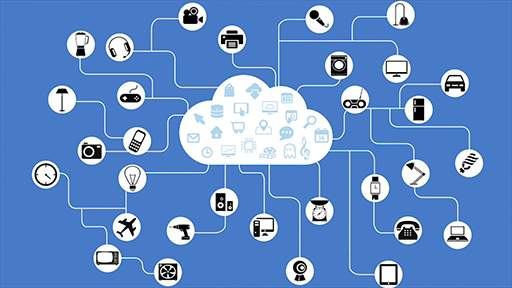
The proliferation of networked computing devices that are embedded in everyday things (often called the “Internet of Things” or “IoT”) is going to pose a significant challenge for cyber security in the future. Already we are seeing examples of security vulnerabilities in home entertainment devices like Smart TVs and internet connected home security cameras. Sources of these security vulnerabilities range from devices that use out of date operating systems or software applications, to devices that do not use any cryptography to protect their communications.
The video describes how different types of system vulnerabilities can be identified by using the Shodan search engine. This is a tool that catalogues millions of devices connected to the Internet, collecting information about the operating systems they use, their configurations and even in some cases default user names and passwords for accessing them.
Using Shodan to find computers connected to the Internet is legal. However, please note that it is an offence under the Computer Misuse Act 1990 to try and gain access to a computer without authorization. And even if you failed to get in, you could well be found guilty of a crime. It is incredibly easy to break the law if you misuse information from Shodan, so don't do it!
Addressing the security challenges of IoT systems is a multi-pronged effort, with researchers in academia and industry working on developing new technology solutions for improving their security. It is also critical that engineers are trained to ensure that security and privacy is considered as a core part of the design and development of all computer systems, including the Internet of Things.
2.2 How to keep up to date

Attackers are constantly finding new vulnerabilities and ways of attacking computer systems. Therefore, it is important to keep yourself informed and up to date with threats that are relevant to your situation.
There are many sources of news about cyber security. Many of them are extremely technical and are designed for security specialists to communicate their findings with one another, for software developers to improve their programs or academic publications. There are also plenty of free resources, written by journalists, security professionals and enthusiastic amateurs, where you can learn more even if you are new to the field.
The links provided below are a selection from those that are available. You are not expected to look at all of them in detail.
Government sites
News sites
The best places to get started are the major media outlets, most of whom employ technology journalists. These sites will give you readable information intended for as wide an audience as possible. Many of them are updated several times a day, but they will only consider ‘newsworthy’ events such as a major hack or virus outbreak, and some will only cover news in a particular country – so you may need to look at a variety of sites:
Technology sites
Many sites devoted to technology will cover aspects of security on a regular basis. Most of the sites below cover other topics, so you might need to use their search functions to find relevant information.
Information security companies
There are a large number of companies selling security software to home users and to businesses. Almost all of them maintain regularly updated websites explaining new and emerging security threats and how they can be overcome.
Much of this information is technical and aimed at administrators responsible for large computer systems, but the introductory material is often quite easily understood. These sites can be the best to use when a new security issue is identified.
Blogs
- Krebs On Security Brian Krebs is an American journalist and investigative reporter. He is best known for his coverage of profit-seeking cybercriminals. His interest grew after a computer worm locked him out of his own computer in 2001.
- Graham Cluley is an award-winning security blogger, researcher and public speaker. He has been working in the computer security industry since the early 1990s, having been employed by companies such as Sophos, McAfee and Dr Solomon’s.
- Bruce Schneier is an internationally renowned security technologist who writes a monthly newsletter, called ‘Crypt-o-gram’. He provides commentary and insights into critical security issues of the day. The content of this blog can be accessed in multiple forms, including a podcast and an email newsletter.
- Troy Hunt provides analyses of different system breaches and useful hints on how to avoid being attacked.
Before you can identify your enemies you need to know who you can trust. First you need to think about, and constantly evaluate who and what you trust, and to what degree you trust them. You cannot rigorously check every possible contact or item of software yourself, so you build up a network of trusted contacts or sources of information. For each of your trusted contacts or sources you need to evaluate the degree to which you trust them. What is their level of expertise? And to what degree do you trust them? If you compare sources of information, to what degree is one simply copying from the other? You need sources that have the expertise and independently evaluate the information you are interested in.
For example, you build trust in a bank because it has branches on many high streets, it is recognised and regulated by The Financial Conduct Authority in the UK and your money is protected by laws in the UK and the EU up to EUR100,000 when in a regulated bank. Based on this trust you may use the bank's website, or an app provided by that bank.
You may share information about yourself with people and organisations that you trust - but even so you need to evaluate what information they might need to have and what they might do with that information.
You throw away that security if you post information about yourself to any stranger who might come across it. So think carefully before placing any information online that may be passed on by a friend, who then passes it on to someone else and so on. Also think carefully about information that might be included in web pages, photos or videos posted online and available to many strangers.
Here are a couple of examples of information you shouldn’t trust:
- Profiles on dating websites: there may be a genuine person behind that profile, but on the other hand it might be a criminal or scammer. Scammers may continue to exchange information for a year or more, drawing you in, using fake information and images from someone else's blog, even exchanging intimate pictures, until there is a very plausible request for money for the plane fare to visit you, or blackmail you over your intimate pictures. You have no basis for trust! Only what they have told you.
- An advert for anti-malware software at a bargain price: the link takes you to a website that claims it is totally brilliant, with lots of reviews on that site saying how good it is. It may also claim that it has been ranked number 1 by various other sites. But note that you have no basis for trust. A criminal can easily create such a website with that information, a shopping cart payment system to take your money and provide software for you to download. At best the software may be useless. At worst it will install malware on your computer and attempt to take repeated payments from your account.
When searching for information on how to keep yourself secure you need to evaluate your trust in the sources of information, and you should start from our highly trusted sources.
Activity 3 Knowing your enemies
Carry out some research about different cyber security threats and the types of groups who pose the threat.
Using the information sources above find out about:
- a threat to your information, computers and other devices that arise from malware
- a threat to your communications (such as spam and denial of service (DoS) or distributed denial of service (DDoS) attacks, often launched using botnets).
For each threat, try to identify the type of individuals or organisations that are posing the threat. Which of the following types would best describe them?
- Cybercriminal: those carrying out cyber attacks for personal financial gain.
- Spies: those engaged in espionage activities on behalf of either commercial organisations or national governments.
- Hacktivists: those who carry out cyber attacks as a form of protest against organisations or governments.
- Insider attacker: disgruntled or dishonest staff who attack their organisation’s computer systems.
If you identify a different type of attacker, how would you describe it?
Spend 10–15 minutes researching, then spend five minutes noting down your findings in the space below.
2.3 Staying informed

Hopefully, you now have some ideas of how to stay up to date with the latest developments in cyber security.
Before continuing to the final part of the week, take some time to plan some concrete steps you will take to keep yourself more informed.
For example, you could subscribe to a blog via email or Feedly, or follow updates via Twitter or Facebook.
3 Securing my digital information

What issues arise in doing everyday activities online? As we’ve already discussed, most of us rely on the internet for everyday tasks such as shopping, working, banking or social networking. We often do this without stopping to think about the security issues that might be involved.
Activity 4 Securing your information
Choose one of the following activities and think about the main security issues that might threaten your chosen activity.
- Online banking – for example, to check the balance in your account or make a payment.
- Online shopping – think particularly about buying something from a new store that you don’t recognise and haven’t shopped from before.
- Social networking – think about whether you would add someone as a ‘friend’ if you hadn’t met them in person.
- Working from home – consider the need to transfer documents that contain confidential information between members of your team.
Answer
The following case study provides an example for the fourth option above, working from home.
Case study: working from home
When working from home you may need to share a confidential file with a colleague in another location. You could email it to them, but this is not a secure method of transmitting information – email is easily intercepted en route to its destination and there is always the risk that you send it to the wrong person!
You could use an online cloud service such as Dropbox, Google Drive or Microsoft OneDrive to store the file, but you will have to make sure that your colleague can access the uploaded file. You might also be worried about the security of the cloud services against hackers.
You could put the file on a USB flash memory drive and post it to your colleague. But the drive could be lost, stolen or intercepted by an attacker who adds malware to the drive as a way of infecting your organisation’s computers.
Or, you could use encryption to lock the file against intruders. You could email the encrypted file safe in the knowledge that no one else could read the document. However, you would have to be sure that your colleague knows how to use encryption software so that they can decrypt the document when it arrives.
Questions to consider
Remember that earlier this week we classified security issues under three headings. We want our information to:
- be read by only the right people (confidentiality)
- only be changed by authorised people or processes (integrity)
- be available to read and use whenever we want (availability).
3.1 Threats to your assets
As you have already seen, for many the threats are most likely to arrive as emails or attached to emails. Another significant threat comes from apps for mobile devices that are not what they seem. In 2019, Sophos reported apps that hide their icons and use other tricks to prevent the user uninstalling them while aggressively displaying advertising.
Other examples reported include:
- Many utility apps don’t initially contain malware but include the code to download and install malware from elsewhere. This extra code installed may be designed to collect your banking details, or lock you out of your phone until you pay the criminals.
- A VPN client that installs a trojan designed to capture banking details.
- Fleeceware – apps that pretend to offer a free trial for some simple function and ask you to provide banking details first. Even after uninstalling the app, users still get charged a large amount unless they explicitly cancel the trial.
You can find up to date Sophos reports at: https://news.sophos.com/ en-us/ tag/ android-malware/
For the final activity this week you’ll update your own list of cyber threats.
Activity 5 Your threats
Update the list of information assets and online activities you compiled in Taking stock of your information assets. Add any threats that are relevant to your assets.
Save this list to use later in the course.
Next, you have a chance to review your learning in the end-of-week practice test.
4 Week 1 quiz
This quiz allows you to test and apply your knowledge of the material in Week 1.
Complete the Week 1 practice quiz now.
Open the quiz in a new window or tab then come back here when you’re done.
5 Summary of Week 1

This week you explored the security threats that could affect your digital information and use of online services.
You also learned how to keep your knowledge of these threats up to date and started looking at how these threats relate to your own information assets and online activities. In the coming weeks you will explore the different ways in which these threats can become attacks.
You have also learned about the wider world of cyber security and how attacks can affect a variety of systems. As we enter into an age where most everyday devices are connected to the internet – the ‘Internet of Things’ – we will have to deal with a growing range of threats and cyber security will be increasingly important.
There is some optional further reading relating to cyber security in a business setting in the further reading section.
You can now go to Week 2: Authentication.
Further reading
Microsoft Security Response Centre
Microsoft – Turning automatic updates on or off
Cyber Governance Health Check: the annual FTSE 350 Cyber Governance Health Check assesses and reports on cyber security risk management in the UK’s 350 largest firms (the “FTSE 350”.)
National Cyber Security Centre – Threat Listing
National Cyber Security Centre – The cyber threat to UK business 2017-2018 report