
Activities
These are a really good way of checking in with the learner and ensuring they are keeping focused and actually taking in the information presented to them. There are a few options for doing this. There are interactive options but there are also more simple ways of doing this, such as in-text questions:
-
This is a simple way of creating a small question to test learners understanding.
-
An answer or a feeback can then be provided to the learner.
And activity boxes. Activities will need a heading and an estimated time it will take for the learner to complete:
Activity 1: Free response example
This allows learners to type in their own response into a text box. The response is saved on our server so that it will still be there when they return (even if they’re using a different device). However, only the learner can see what is entered. The learner has to save the response before moving to another page and they must be enrolled on the course for this to work.
What is your favourite colour and why?
Activity 2: Write a response example
What is your favourite colour and why?
Answer
Blue, because I've a soft spot for 450-495nm wavelength light
Activity 3: Multi-part example
Part 1
This is part 1 of the activity.
Comment
It can have a discussion if you wish.
Part 2
This is part 2 of the activity. It has a Heading and an Answer.
Answer
You can put an Answer here - it can be plain text or a table or a figure or video.
Part 3
This is part 3.
Answer
You can put an Answer here - it can be plain text or a table or a figure or video.
Activity 4: Single choice example
a.
David Tennant
b.
Brad Pitt
c.
Hugh Jackman
The correct answer is a.
Activity 5: Multiple choice example
a.
Bill Clinton
b.
Bill Gates
c.
Ronald Reagan
d.
Arnold Schwarzenegger
The correct answers are a and c.
a.
Yes, Bill was the 42nd US President serving from 1993 to 2001
c.
Yes, Ronnie Raygun, as he was affectionately known in the UK, was the 40th President. He served from 1981 to 1989.
Activity 6: Matching example
This tag lets you set up simple ‘drag and drop’ activities in which pairs of words or images are matched up.
Match the fruit to the right colour.
Using the following two lists, match each numbered item with the correct letter.
-
Carrot
-
Banana
-
Apple
Match each of the previous list items with an item from the following list:
a.Orange
b.Yellow
c.Green
- 1 = a,
- 2 = b,
- 3 = c
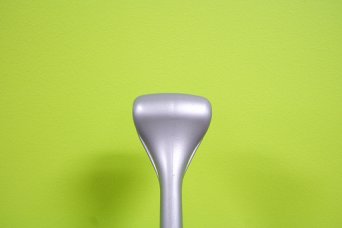
Activity 7: Example with a figure in the question
What do you think this image shows?
Answer
It's part of Perry Building (wall and coat hook).
You probably won't be able to tell that from the exported version!