

Course assets
All course assets are handled by the OpenLearn Assistant Producer, their role in the production is develop all course assets as well as ensure all assets are cleared for use on the platform.
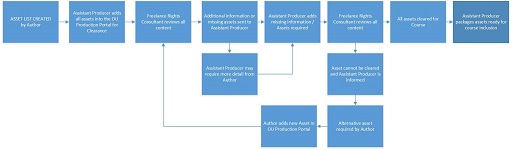
All assets selected for your course will be added to the OU Production Portal and cleared for use. If there is any issue with the selected assets we will contact you to look for alternatives to use which may impact rewriting the content of your handovers. Pleaes include all URLs to pages for the content and if you have a download of the assets please also send thorugh.
Please use the above Assets handover spreadsheet, this will list all assets to be used in the course and will allow OpenLearn Assistant producers to easily add your assets into the OU production portal. Once you have finished your document please send this across to the OpenLearn Senior Producer and assigned Editor of your course.
Reusing existing assets
It is important to see each BOC as a distinctive course with particular overall and weekly objectives. You may be considering re-using existing materials, so an early task will be to identify key elements that might contribute to meeting these objectives. The activity planner is particularly helpful in thinking about the activities which learners will be expected to engage in and which are relevant to the outcomes of the BOC.
Although a lot of OU material is now online, it’s possible that if you are repurposing material it was originally designed for print. If this is the case, the most important aspect of repurposing is to consider the extent to which existing materials can be used as they are and what alterations or adaptations will be needed.
As with the Third-party assets, we will need to reclear all previuosly OU created content as well, so please add this to the Assets handover spreadsheet. It would be useful to us to have the URL to the module website page where this is or if you have asset details please add. If there is any further information required, an Assistant Producer in OpenLearn will be in contract to find further details.
Third party assets
OpenLearn BOCs will have a large number of third party assets, these can images, quotes, articles, videos and audios. When selecting third-party assets for your course please provide all copyright information as well as a URL to the source so that these can be cleared for use on an open platform such as OpenLearn. When selecting assets please think about their use within the course and how you may be able to adapt your content to make the course media rich.