

2 Using corpora in the EAP classroom
In this section, you’ll watch a video of Maggie Charles teaching a group of postgraduate students. The students are sitting at long desks and each student uses a computer built into the desk. Maggie sits at the front of the class and can project her computer screen onto a larger screen.

Maggie’s class uses a corpus of Social Science texts for her postgraduate students to explore together. This corpus was put together by Maggie and contains student theses – or dissertations - from Politics and International Relations. It’s quite specialised, but this means it’s useful for finding out how language is used in a particular area. Across the term, the students in Maggie’s class learn how to build their own corpus of texts from their own particular discipline.
In this class, Maggie uses a computer program called AntConc (Anthony, 2022) to help students explore the language used in a corpus of written academic texts. AntConc is free software - if you’re interested in trying it out you can download it for free from Laurence Anthony’s website [Tip: hold Ctrl and click a link to open it in a new tab. (Hide tip)] . There are helpful video tutorials on this website too.
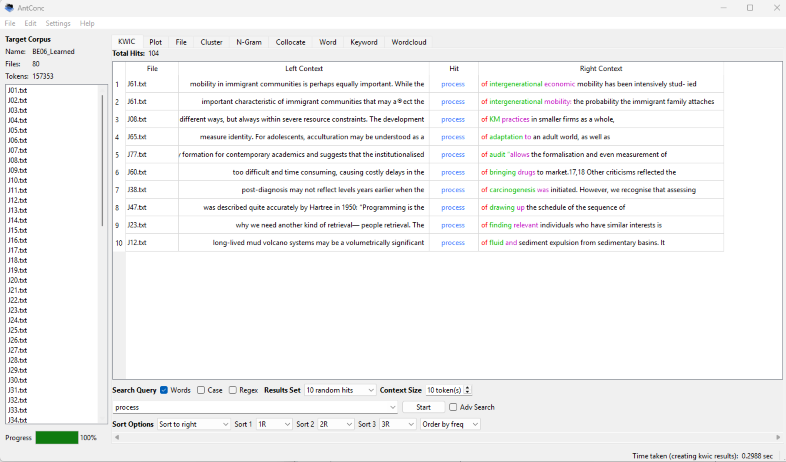
Figure 1 shows concordance lines in AntConc. A concordance line displays a word in context (i.e. with the words it appears with before and afterwards); it’s a way of looking at a lot of words at once and sorting for patterns. The software allows the linguist to sort to the left or right of the search term and see what words often appear with the word. In Figure 1, the filename appears on the left, followed by items to the left of the search term process, then items to the right. Note that concordance lines are read from top to bottom, rather than from left to right. In this example, the concordance lines are sorted to the right, and show examples of process followed by of.