
2 Types of data
In this section you are going to move away from sampling and think about the data itself.
Decisions made early in a data handling project impact on what calculations and graphs may be used. Have you ever wondered why sometimes bar charts have gaps between the bars and sometimes they do not have gaps? This is not just the preference of the graph’s creator; it is determined by the type of data that the chart is representing.
Here we are going to cover the ‘traditional’ types of data as covered in the school curriculum i.e. words and numbers. However, non-standard data types, e.g. photographs/images, most used emoji, sample of voice/sound, are increasingly being used.
In the following box is an idea for introducing the idea of different data types to learners.
Sorting population characteristics
Ask learners to think of and list possible characteristics they could ask people if they were doing a population survey. Start them off with some examples like height, shoe size and favourite colour.
After a few minutes, gain feedback from the learners. As you record each characteristic on the board, silently decide what kind of data it is and write in an appropriate colour (or column) as follows:
- Colour 1 for any characteristics that are communicated using words e.g. surname
- Colour 2 for any characteristics that are usually written using specific values e.g. shoe size
- Colour 3 for any characteristics which are measurements, e.g. height
Below is an example of what your board might look like; note there are no headings on the columns initially since you want the learners to work out the link between the data items in each individual column.
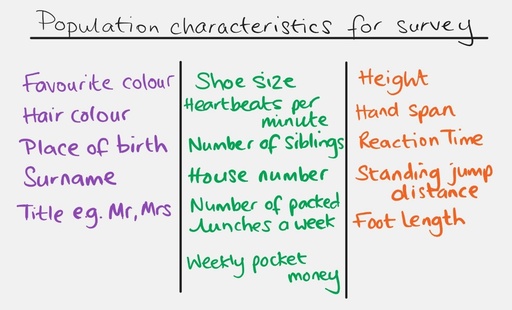
Ask the learners if they can identify why the characteristics have been sorted in this way e.g. ask ‘If you were going to give information about all the items written in the first column, would your answers be words or numbers?’. You might need to give examples of possible answers to each characteristic to make the links more obvious. When the links have been made, be sure to title each column with its data type.
As is always the case when dealing with learners, you will likely get some ‘odd’ answers that do not seem to fit into any category e.g. postcode. Note these to one side and refer to them later in discussion about why they do not fit into one of the three areas.
‘Age’ is also an interesting characteristic for discussion in terms of the fact that we usually record it in a whole number of years, or sometimes years and months, which would place it in the middle category but, in actual fact, it is a measurement of time which places it in the final category.
The characteristics communicated using words (purple in the image above) are examples of qualitative data. You may have heard of the phrase ‘it is the quality not the quantity that counts’. Qualitative data refers to the qualities that something or someone has, and these are usually described using words.
The other characteristics can all be recorded using numbers therefore these give rise to quantities or numerical data; this is quantitative data. The items written using specific values (green) give discrete quantitative data; discrete in this sense meaning separate. Those requiring measurement (orange) are continuous quantitative data. One definition of continuous data is something which could be measured more accurately with better equipment. The key difference is that one sort of quantity (discrete) is assigned an ‘exact’ value and the other (continuous) can never be truly ‘exact’. Continuous data are often organised in groups to allow for this inexactness.