Ella Schierbeek Post 1
• 2 September 2015, 9:19 AM • Edited by the author on 2 September 2015, 9:38 AMSemaine 3, Act. 4, Apps
Over the past three years I've tried Duolingo and Busuu but not for long, they didn't suit me, too simple and not enough return for the time involved.
I started Rosetta Stone at level 2 out of 5 three years ago and completed the course, with very long gaps, early this year. It was really useful as a place to spend time with the language in a constructive way. The Studio Sessions were very useful to practise spoken French. The course is a lot cheaper than taking a weekly language teacher.
I've tried lots of other language apps and only a few have proven to be really useful to me:
Flash card apps like Flashcards and Quizlet (the online management system for Flashcards, but it also has its own app). You can download other people's topic lists. Flashcards and Quizlet were useful during my two A level years just completed, to revise vocab to fill time e.g. while waiting somewhere. But I found my own vocab book and topic-specific paper vocab lists much more productive for learning. I would try but generally failed the 20 words by heart a day maxim.
Newspaper app: I use Le Monde online (left of centre. Le Figaro is right of centre). Will prob give the latter a try next. It get the App as well, plus options such as my daily headline App, favourite topics App. Useful French exposure, even just skimming the headlines.
Podcasts I haven't started yet in French, but I often listen to live French radio on TuneIn Radio app. With Sonos wireless speakers you can beam it to any room in the house. I guess French podcasts would be useful in the car and while travelling.
I don't use translation apps as I find the quality awful.
I sometimes use Forvo online to check pronunciation http://fr.forvo.com/search-fr/vais/
Dictionary: I have sworn by Oxford Hatchett's French Dictionary App and online, which is my fifth limb. Expensive to buy but over three years has outlasted the iPhone.Very fast online search function within an entry by just keying Find Cmd/F. Useful audio for the words and even for phrases.
I use Skype online to talk in French with an American lady I met on a Rosetta Studio session. I use WhatsApp for French convo specifically with a few friends who are learners.
I use Verb2Verb App to check conjugation. Also Vatefaireconjuguer.com online http://www.vatefaireconjuguer.com/search?verb=savoir
I'm starting to use the French dictionary Antidote more,available to download. It includes the online and App versions. Check out the incorporated illustrated dictionary to learn words around a theme e.g. if you need to kill time. I find the dictionary and all the other functions, synonymes, antonymes, conjugation, much better laid out and easier to use for me than Le Grand Robert online, which has a trial version.
BonPatron App checks text message French spelling but not grammar. Copy and paste the text into BP.
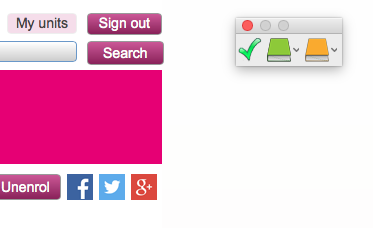
Language checking: Antidote checks my French emails automatically before they're sent, for spelling and grammar. It explains what's odd, points out alternative spellings/meanings, and gives suggestions. It checks French postings online when I highlight them and click the Check tick on my desktop (see screen shot link, above right).
So my top Apps / online aids: Oxford Hatchett's, Antidote, Verb2Verb, Le Monde, TuneIn Radio on wifi using Sonos.
Off-topic, the élan Grammar Workbook covers all French AS and A2-level grammar, so up to international B2 level. Just exercises with the answer booklet.
I look forward to seeing other people's favourites!
What a comprehensive list! I will save it to refer to. I tend to take no notice of talk of apps as I don't have an iPhone, but notice that some of your suggestions are available on computers.
I am particularly interested in Antidote. At the moment I am using Open Office as my computer with Word is in hospital with a hopefully not fatal disease. I have a spell checker on Word but the grammar check doesn't seem to work very well. I have downloaded a spellcheck on Open Office but couldn't find a grammar check. Do you happen to know if Antidote works on Open Office? I have looked up information and it mentions checking emails. Can you also check documents, eg TMAs?
I use the paper Oxford Hachette bilingual dictionary (recommended by my daughter who is a professor teaching French). Online I like the Oxford Dictionaries via the OU library and Wordreference, which gives spoken pronunciation and also some phrases and expressions which don't appear in the Oxford online.
I can't believe you have only just done A level - your French seems so advanced. Maybe it is something to do with learning 20 words every day. I have started reading Le gone de Chaaba after your recommendation, but find I have to look up quite a few words. Will also try to listen to more radio.
Mavis
- Jump to: Parent to post 1
- Permalink to post 2
Ella Schierbeek Post 3 in reply to 2
• 3 September 2015, 12:23 PM • Edited by the author on 3 September 2015, 12:27 PMI read Le Gone du Chabaâ about a year ago, to decide which book to choose for the 2nd year A-level. I read 6 novels, all brilliant. But quickly stopped looking up every word I didn't know, instead getting a sense of the meaning from the context. I therefore missed some of the finer descriptions, but instead was able to progress with the storyline. I look up important words when you clearly realise it's important to the story. Before this batch, in A-level year 1, I read through the FFL series Monde en VF published by Didier, starting at international A2 level and finishing with the B2 books (A-level French and L211 level). They are all brilliant, except I couldn't get into Un Cerf d'Automne. I have since reread quite a few of them, getting more out of them!! www.mondesenvf.com. I particularly liked 'Papa et autres nouvelles'. All available on Amazon.fr which uses your UK login and payment details. My French level is just that of just completed A-level French and I understand L211! But my spoken French is tiresome to a French listener, I watch their eyes glazing over as I stumble along :) I started private convo lessons at the start of the year at Inlingua, they are brilliant, before that I could only say boo in French. Money well spent I think, mon enseignante tells me she sees or rather hears results. The 20 words a day was a goal, achieved only occasionally! But those days felt great hehe.
Antidote we were encouraged to use during a summer French language course at the University of Lausanne, attended predominantly by prospective students. So I reckoned it must be good and it is! It automatically checks emails and internet (except I haven't got the latter to work) plus anything else you write in any programme, if you highlight it then click on the green tick in the floating Antidote bar, or on the Antidote icon. It presents your text in a separate window. Just double click on a red underlined word to correct it. Orange underlined means beware, this word has different sounds/spellings. Squigly lines: you're not making sense. So you play around a bit to see if it will accept your new phrase :) Agreement, add an 's' with one click. Also a verb in any tense, highlight it, click on the dictionary icon, and its entry pops up, with all the other options such as Conjugation, Antonymes, etc etc. Well worth the outlay. The corrections are automatically and simultaneously made in the original doc.
Yes the online Oxford Hatchett's is now called Oxford Dictionaries. I prefer online because of the larger text, and the super fast search/find within the entry.
I listen to French radio at every opportunity via TuneIn Radio app and Sonos wifi speakers, and in the car. You can set up TuneIn online I think. I didn't understand anything just odd words two years ago, but painfully persevered, it was so boring, and one day I suddenly realised I understood nearly all of it. So that really works.
As an aside, other French literature I really enjoyed reading was La vie devant soi by Romain Gary, Voltaire's Candide in dual language version for fast vocab check, this book's content is 18th C at its most shocking! L'Etranger by Camus (my exam choice), La gloire de mon père and Le chateau de ma mère by Marcel Pagnol, La place by Annie Arnaut, Un sac de billes by Joseph Joffo. For each one I also had the GB version for fast vocab checking when really necessary.
Looking forward to other people's favourite, most useful apps etc. Possibly will be the same?...
- Jump to: Parent to post 2
- Permalink to post 3
Frantastique
Frantastique is a 15 mins a day French course App from Le Monde. Very funny and very instructive, centred around a planet in the universe and Victor Hugo who occasionally finds a photo of himself sur la une in a compromising bedroom scene. Sometimes he's depicted naked in his home, with a knee-length beard. Or there's Henry Lefebvre, the accountant on the planet, who doesn't understand sums but strums simple guitar tunes to ask for a raise or cheer someone up, to everyone's annoyance. Lots of cultural bites and info - song, film - to follow up. First month is free, then a small charge. Daily French and office lingo. Level and progress totally geared to your particular level and pace. *****
- Jump to: Parent to post 3
- Permalink to post 5
Brilliant, Ella, thank you. Available on Kindle and I've installed it. When I mentioned ignoring apps I had forgotten that
I can use my Kindle. I bought it for reading foreign language books because of the inbuilt dictionaries, and forget that
it can be used for apps. Keep up the recommendations on the module site when it opens!
- Jump to: Parent to post 5
- Permalink to post 6
Apps on Kindle, I hadn't realised that. You can also do Frantastique online, I should have mentioned that. Maybe easier for typing than the Kindle. Enjoy! It's very funny! You get the option to stick with the Real Life (saucy) version or the Tame (Censored) version ;) I've found that if you want to do 6 or 7 days a week, you just change the available days of the week as often as you like.
- Jump to: Parent to post 6
- Permalink to post 7
Glad you mentioned that. Frantastique is possible on a Kindle in theory, but having tried it I had decided
not to persevere. It's too slow and not responsive enough - some things just wouldn't work, but it does seem
fun. I'll try to use it on my desktop. My computer is now back from hospital, almost restored. I've lost some things
but most of the important stuff is still accessible. I have a busy two weeks or so trying out all your suggestions!
I love your enthusiasm and your varied interests, but don't know how you find the time. And I'm retired!
- Jump to: Parent to post 7
- Permalink to post 8
You get the measure of me, if I decide to do something and pay a lot of money for it, I want to do it properly :) I had to totally give up evening TV, except for the odd programme and good films, to do the French A-level the past two years, and can see it'll be the same for this course. Gave up free time the last three weeks to work through the activities and contribute to the forums. But every French forum post is great practise! Btw I really appreciated our open discussion yesterday with Annie and that she corrected some of our mistakes in the comment box.
Those Apps are the ones left after I discarded all the others as time wasters for me.
You'll certainly need to spend time getting to know how the apps can help you and if you want to keep them. But after that, once you know them they save time, like this morning, I wanted to check 'survenu' in a Prépa link. I did that with a highlight on the online page and a click on Antidote which brought up the conjugation, then a click on Definition. I also could have done it with Verb2Verb, with less info. So that saved a lot of time compared to looking it up in the paper dictionary. Then I took 5 secs to write it in my little vocab book, a new development and intended - operative word - for my travelling handbag...
I wasted a LOT of time yesterday early evening looking into EndNote for citations and bibliography, digital method all new to me, as the OU reference software is being discontinued. EN wouldn't sync despite lots of fanfare about that function. Imagine how much I tried! before I googled the problem and it's been there since 2008! Makes me mad. Next opp I'm going to look at RefWorks I think it's called. Bring back the good old days where we just got out the paper books and wrote down the bibliography on the final draft!! Probably took less time than dealing with the software and getting distracted online...?
Did you use referencing software for L211? I want to figure it out before October.
Lovely to reply to you during my Saturday lunch break. Must dash :)
- Jump to: Parent to post 8
- Permalink to post 9
I did a library tutorial on RefWorks, which was very interesting and comprehensive, but I found it
didn't help with the courses I was doing. No, I haven't used referencing software. - didn't know
there was any! For the English U214 we were given a referencing guide,
a simplified version of Harvard which was what the English department liked. I used that for
referencing for L211 and intend using it this year. I can send it to you if you let me have your email
address. Basically it is a set of examples of references for a book, an OU module, a DVD etc, which
you then adapt for what you are using.
Here is a link to the official OU Harvard guide
http://learn1.open.ac.uk/mod/oucontent/view.php?id=2620
I am definitely going to investigate Antidote now I have my computer back and can use Word.
I had to re-install Office, of course, plus Blackboard Collaborate and several other things - more time
not exactly wasted, but taken up.
- Jump to: Parent to post 9
- Permalink to post 10
Ella Schierbeek Post 11 in reply to 10
• 6 September 2015, 3:21 PM • Edited by the author on 6 September 2015, 3:32 PMRefWorks
Thanks Mavis for the link, I've gone through the parts that apply to us, really useful as the tutorial could only touch on it.
Referencing software I've discovered is a programme like online RefWorks, but the difference is that you can install it on your desktop. E.g. EndNote, which sits in a window beside your word doc, so you can easily see the headlined list of your references the whole time. Click on one and it pops into your Word doc. With EndNote the bibliography/reference list is created automatically while you type. With RefWorks you create it manually online, then copy and paste it into your doc. I've got a 30 day free trial of EndNote desktop, after that I'll be restricted to EndNote Basic online, like RefWorks. So I'll choose one then.
However, RefWorks does now have a toolbar for Word which allows you to search your refs from within Word and place them in the doc as you type. You can install the toolbar from one of the RefWorks dropdown menu tabs. Cite as You Write or something like that. Word must be closed during install. Then in Word select View/Toolbars/RefWorks.
What a drag about your computer and reinstalling everything! But better now than later!
You have my email address in the docs I forwarded to you from Annie...? Let me know if you've lost it. But I think I'm OK with the ref style now from your link and as I like tech stuff I'll use one of these programmes, you can specify Harvard style.
Sorry for the long post if you already know all this!!
Let me know in due course how you get on with Frantastique and Antidote :)