
1.7 Skills And Knowledge Needed
Choosing a career path becomes more meaningful once you have a clearer idea of what you might want to do. Now that you’ve explored your interests, values, and strengths, the next step is to understand what skills and qualifications are required for the field(s) you are considering.
Every career comes with its own pathway. Some require formal degrees, others need short courses or technical training, and many emerging roles simply need strong digital skills and practical experience. It is important not to guess but to research what is needed so you can plan your education in a realistic and informed way. You should also keep in mind how technology and job opportunities are changing, which is a topic we will explore further in Section 2. This doesn’t mean you must choose the “fastest-growing” career, but it does help you to understand what the future may look like and which skills will help you to be more future proof in your career.
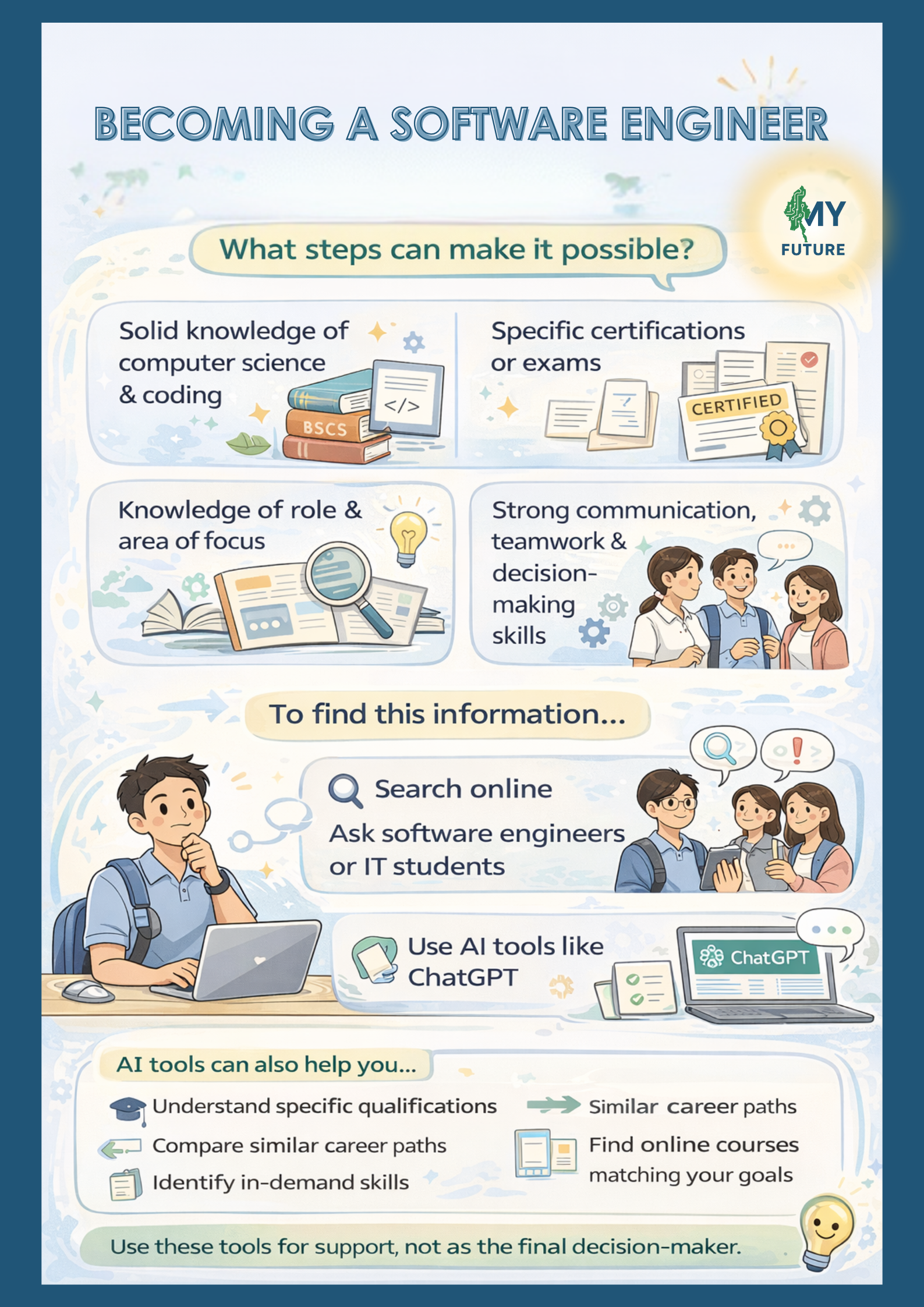
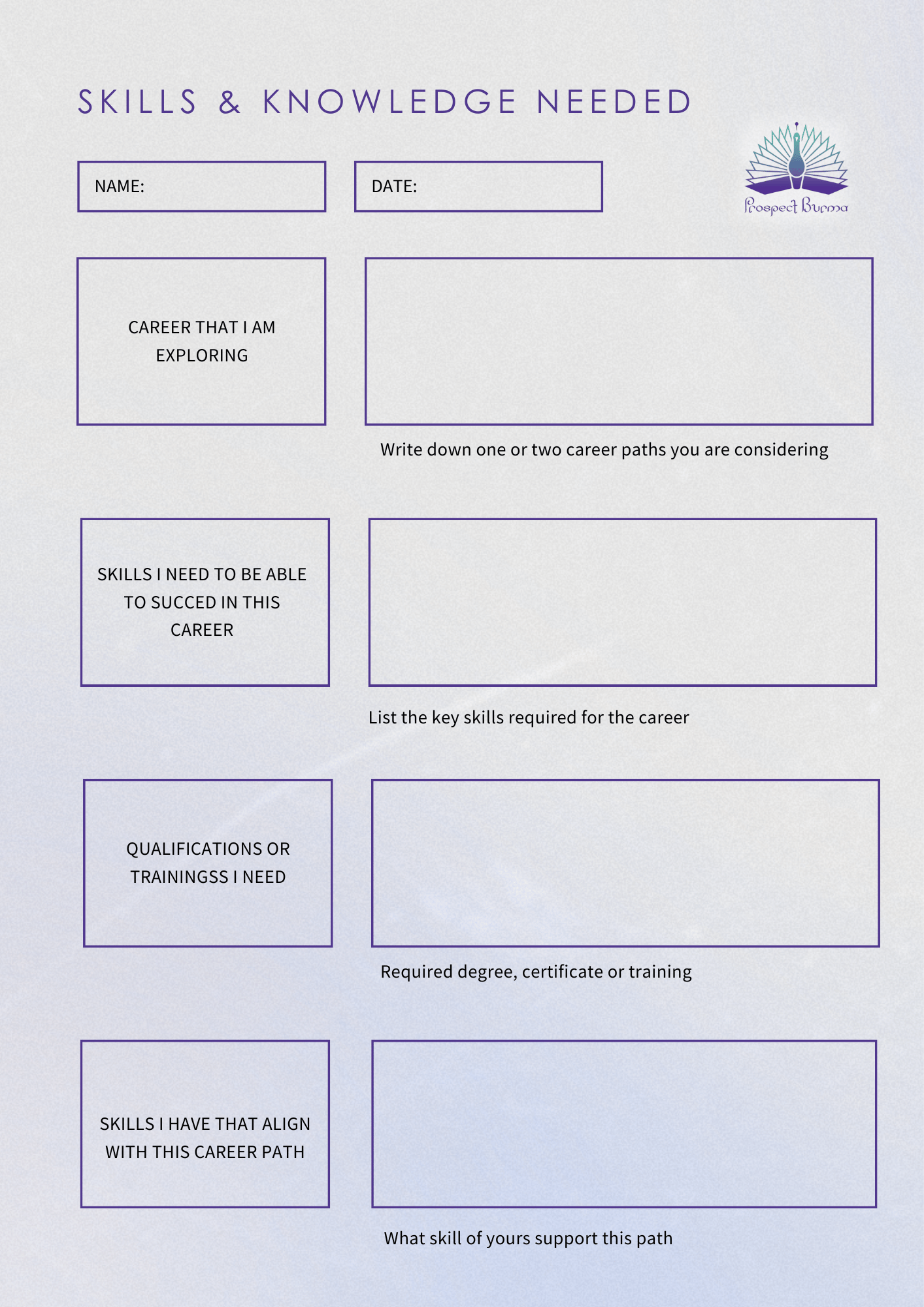
One helpful approach is to pick one or two career options and look up the qualifications, skills, and experience required for each. Many students are surprised to discover that some roles they assumed were “too difficult” are actually achievable with the right preparation, while others require steps they had not previously considered.The image below depicts an example illustrating what you can do if you, in the future, would like to become a software engineer. Following this example is a worksheet that you can use to write down and explore the skills & knowledge needed to go into a specific path, job role, for a career in a given sector. Make good use of those and you will find yourself becoming more aware of your preferences and the pathways you can take will become clearer little by little.
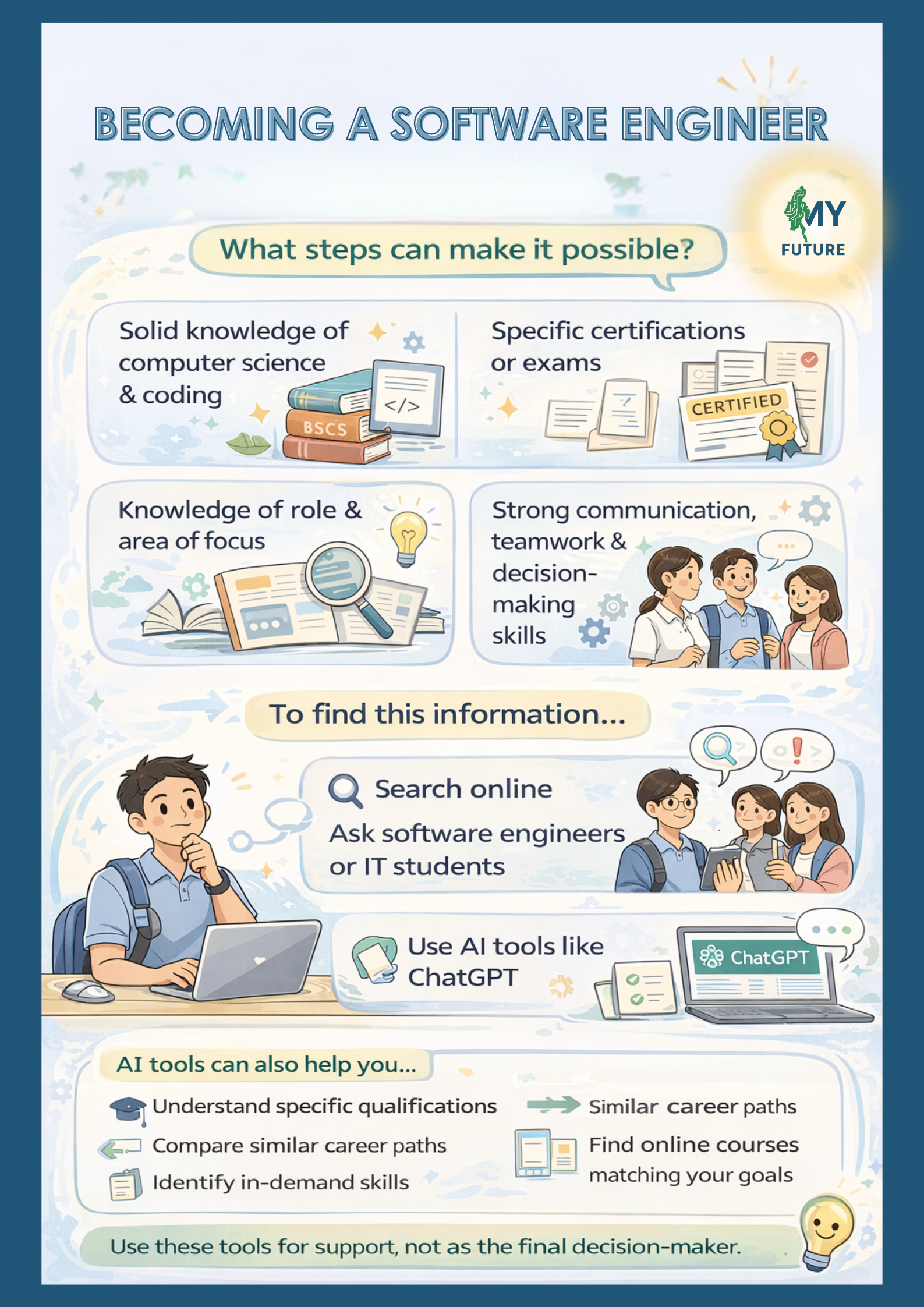
Click to view the image in full screen
Use this worksheet to explore your skills and knowledge needed for your interested career.
Download Worksheet
Click here to go to the next page
Note: the background style and characters of the infographic contained AI generated content generated with the prompt below
Create a visually engaging, professionally illustrated educational infographic using the content provided below.
[Insert written content]
IMPORTANT: Use this given content to create an infographic. Do not simply illustrate the topic. Read, understand, organize, and visually structure the supplied content into a coherent educational infographic.
1. FORMAT AND OVERALL LAYOUT
-
Portrait orientation, approximately 2:3 aspect ratio.
-
High-resolution educational poster suitable for digital learning materials and social media.
-
A dark teal-blue outer border framing a warm, very light cream or pale blue background.
-
Organize the information into clearly separated sections using rounded rectangular panels and soft pastel backgrounds.
-
Use a logical visual reading flow from top to bottom.
-
Create a balanced composition with a combination of text, illustrations, icons, and decorative elements.
-
Ensure the infographic is informative without appearing overcrowded.
2. HEADER SECTION
At the top, include:
-
A prominent, large uppercase main title.
-
Use attractive blue outlined lettering with a subtle dimensional or hand-drawn appearance.
-
Below the title, include a smaller rounded subtitle banner containing a short introductory question or supporting statement.
-
Add a small decorative educational emblem or thematic illustration near the top-right corner.
3. MAIN INFORMATION SECTIONS
Organize the supplied content into several rounded rectangular information cards.
-
Use a combination of two-column layouts and full-width sections.
-
Each card should have a clear heading and a concise explanation.
-
Include small illustrations, visual metaphors, and relevant educational icons alongside the text.
-
Use different pastel backgrounds or subtle variations to distinguish the sections.
-
Allow illustrations to overlap slightly with card boundaries for a more organic illustrated appearance.
-
Avoid making every section look identical. Vary the composition while maintaining visual consistency.
4. ILLUSTRATION STYLE
Use a consistent hand-drawn educational cartoon illustration style throughout.
Include:
-
Friendly teenage students and young adults.
-
Students studying, reading, researching, discussing, and using technology.
-
Characters holding books, notebooks, folders, or other relevant educational objects.
-
Small thematic illustrations such as computers, books, certificates, magnifying glasses, light bulbs, globes, arrows, and other relevant objects.
Characters should look approachable, mature enough for secondary school and university-level educational materials, and have natural expressions and poses.
Use illustrations that directly reinforce the information rather than adding unrelated decoration.
5. SECONDARY INFORMATION AND PROCESS SECTIONS
When the supplied content includes steps, processes, recommendations, or ways to find information:
-
Present them as a visual sequence or clearly separated information blocks.
-
Use arrows, icons, speech bubbles, or small character illustrations to communicate relationships.
-
Highlight important phrases using soft coloured banners.
-
Use smaller supporting text underneath the main headings.
-
Make the relationship between different steps or ideas visually clear.
6. FINAL SECTION / TAKEAWAY
At the bottom, include a clearly distinguishable summary or takeaway panel.
Use a soft pastel background with rounded corners and a short concluding statement drawn from the supplied content.
Include a small thematic illustration near the bottom corner to complete the composition.
7. VISUAL DESIGN AND COLOUR PALETTE
Use the following visual direction:
-
Dark teal blue: outer frame and major accents.
-
Pale sky blue: main background and information panels.
-
Warm cream and ivory: card backgrounds.
-
Muted turquoise: supporting accents.
-
Soft sage green: secondary highlights.
-
Muted yellow and peach: emphasis and decorative details.
-
Dusty pink: occasional character clothing and visual accents.
Use soft watercolor washes, subtle paper textures, delicate hand-drawn outlines, and gentle shadows.
Decorate empty spaces with subtle watercolor flourishes, leaves, sparkles, arrows, and small educational symbols.
8. TYPOGRAPHY AND READABILITY
-
Main title: large, bold, uppercase, visually distinctive.
-
Section headings: medium-sized, bold, dark teal or navy.
-
Supporting text: clean, simple, highly readable sans-serif lettering.
-
Highlight important phrases using coloured banners or emphasis.
-
Maintain consistent typography and clear visual hierarchy.
-
Ensure sufficient contrast between text and background.
-
Avoid excessively small text.
9. CONTENT INTEGRATION RULES
-
Use the supplied content as the primary source.
-
Preserve the original meaning, key concepts, important details, and terminology.
-
Identify the main topic, supporting ideas, steps, examples, and takeaways.
-
Group related information into meaningful sections.
-
Rewrite lengthy sentences into shorter, infographic-friendly statements without changing their meaning.
-
Do not introduce unrelated information or invent facts.
-
Do not omit important information simply to make the design easier.
-
Choose illustrations and icons that are relevant to the actual content.
-
If the content is extensive, use additional space or more information cards rather than making the text too small.
10. FINAL OUTPUT
The result should look like a professionally designed educational infographic from a modern learning resource or educational textbook.
It should be visually attractive, friendly, informative, easy to follow, and appropriate for secondary school students and young adults.
Maintain the same overall illustration style, colour palette, layout principles, and visual identity throughout the infographic.