
1 What is Turnitin?
Turnitin is a text-matching software tool used by many educational institutions to scan submitted student assessments against a database of internet sources, published works, and previously submitted student papers. It can also be used to help you check your writing before you hand in your assignments.
When you upload your work to the Turnitin draft link on your assessment tab, it creates a report (see Figure 1) that shows where your writing is like books, websites, or other students’ work. This doesn’t mean you’ve done anything wrong – instead, it’s there to help you see if you’ve used your sources properly. Turnitin’s main function is to highlight instances of textual similarity—not to decide whether plagiarism (or misconduct) has occurred.
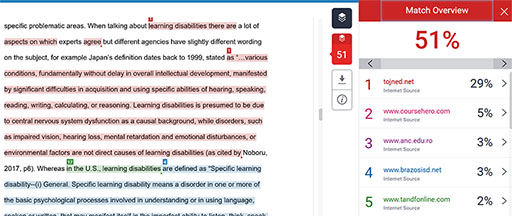
Using Turnitin formatively allows you to engage with your writing process early and regularly, rather than viewing similarity checks as purely a punishment or as evidence of plagiarism. Submitting drafts for Turnitin gives you access to a similarity report (or originality report) that identifies matched text and sources and can guide you in refining citation, paraphrasing and referencing before final submission, promoting academic writing skill development.
Research also shows that when Turnitin is used as a developmental tool, your perceptions shift: you can use it as a learning tool rather than simply a plagiarism detector (Oldham, 2025). This approach supports the broader benefits of formative assessment — enhancing understanding, scaffolding performance, and empowering you to self-regulate learning (Marks, 2025). By enabling safe revision cycles, you can correct misconceptions, improve academic integrity habits and reduce the possibility of misconduct. The feedback loop created by formative Turnitin use thus fosters academic confidence, stronger writing practices and enables you to have more choice and responsibility for your learning and writing.