

5 A step-by-step guide to Turnitin
Watch Video 1 which demonstrates how to use your Turnitin report before submitting your work.
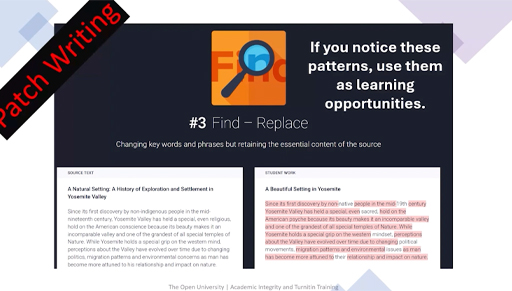
Transcript: Video 1
When you open your Turnitin report, start by remembering that it is a learning tool, not a judgement or a ‘plagiarism score’. The overall percentage does not tell you whether there is a problem. What matters is understanding where the matches appear, why they are there, and what you may need to revise.
Follow these six steps to help you use Turnitin effectively.
Submit your draft and collect your report. The link to submit your draft assessment will be made available to you on the Assessment Tab of your module. To submit a draft assessment you need to click on this link and follow the instructions. It will be similar to attaching a document to an email.
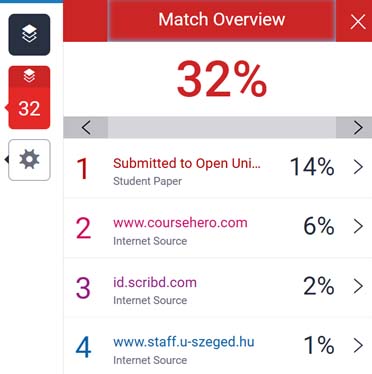
To open your report click on the link or the coloured box near the similarity score.
This will open the Turnitin viewer, where your writing is shown in the main window and the list of matched sources appears on the right-hand side. At this stage, ignore the large percentage. Instead, click through each individual match to see the highlighted sections in your work.
Check each match by clicking on the hyperlinks on the right-hand side of your report. When you click on the link it will take you to the corresponding original source online.
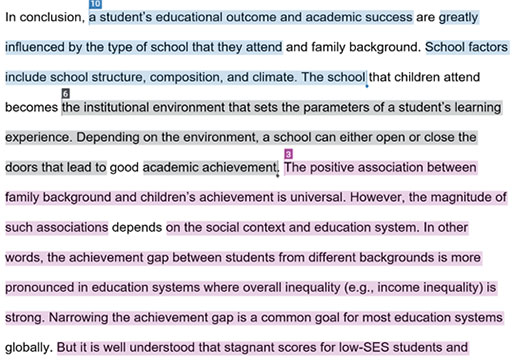
As you review each match (indicated by each number), ask yourself whether the highlighted wording genuinely belongs to you. Sometimes the match is harmless—for example, it could be your reference list, a template, or a commonly used academic phrase. Other matches, however, may show where you have used someone else’s ideas or wording. If the text is almost identical to the original source and you have not cited it, or if you intended to paraphrase but the structure still mirrors the original closely, you need to revise that section.
Figure 9 shows an example of where paraphrasing has been ineffective, and citations are missing throughout each coloured section. This section would need to be revised. You do not want to see lots of block highlighting. There should also be more citations because a citation tells your reader where you got your information from and what your source is.
As you revise your work, think carefully about where you should place citations and references. Every time you use another person’s idea, whether you quote directly or paraphrase, you must include a citation. Quotes need quotation marks and an in-text citation immediately afterwards. Paraphrased ideas should be expressed fully in your own wording and structure, followed by a citation at the end of the sentence or section. If you use data, images or figures, reference them in the caption. At the end of your assignment, make sure your reference list accurately includes every source you cited, formatted consistently and in alphabetical order.
When Turnitin shows an issue, decide whether you need to quote or paraphrase. If it is a direct quote, keep the exact words, add quotation marks and include a citation with a page number if available. If you intended to paraphrase, close the original source, rewrite the idea in your own words, then compare afterwards to ensure it is genuinely different. Add the appropriate citation and update your reference list.
Finally, re-read your entire assignment to ensure the writing flows and reflects your own understanding. If your course allows resubmissions, upload a revised draft to Turnitin to check that the problematic matches have been addressed. A good final check is to make sure you can explain every idea in your work without looking at your sources. If something still feels unclear, speak with your tutor—they are there to help you use Turnitin confidently and ethically.
Plagiarism and collusion
Turnitin can also reveal two types of issues: plagiarism and collusion. Plagiarism typically appears when your work contains long passages that match published sources such as journal articles, websites or textbooks, without proper citation or quotation marks. These blocks often indicate patchwriting, copy-and-paste work, or missing references.
Collusion looks different: here the match is usually to a ‘submitted paper’ or another student’s work. Large similarities with another student’s assignment—whether from your course or elsewhere—suggest unauthorised collaboration or sharing of work. Even if the wording has been lightly changed, the structure and sequence often give collusion away.
The next section will look at how to paraphrase effectively in your work.