

3 Using the menus
This activity builds on the previous one by encouraging you to explore the menus available in Jamovi. It guides you through each of the main menu options, providing a brief overview of their purpose and the different tasks they allow you to carry out.
Activity 2: Exploring the Jamovi menus
Timing: Allow 20 minutes
By becoming more familiar with the layout and features of the software, we hope you will feel more confident and less anxious about using Jamovi in your own work.
Download this video clip.Video player: Video 1: Overview of menus in Jamovi
Transcript: Video 1: Overview of menus in Jamovi
SPEAKER
Overview of menus in jamovi. This tutorial aims to provide you with an overview of the menus in jamovi and to explain their function. This will be helpful for you when you need to use jamovi for your own work.
jamovi has several menu options located at the top of the screen, as with any other computer program. This tutorial will go through them one by one. To follow is a summary of the key menus and their functions.
Firstly, the File menu. The first icon in our toolbar is three horizontal lines, which represents the File menu. If you click on this icon, you will see these options available to you. The menu allows you to start a New data set, Open a data set, Special Import files to combine multiple data sets, Save or Save As any of your work, Export results or data to PDF, HTML, or other formats.
The Variables menu. The second menu in our toolbar is the Variables menu. Here you can manage and customize the variables in your data set. The Variables menu is essential for ensuring that each variable is correctly formatted before running any analysis, as the type and structure of a variable determine which statistical tests are appropriate.
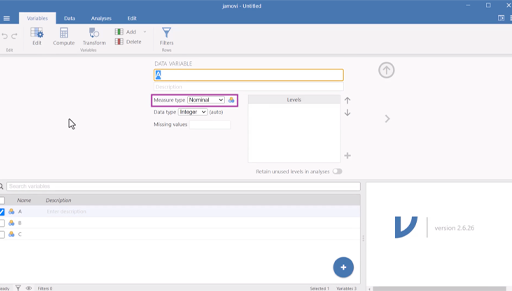
Under Variables, you will have an icon named Edit. By clicking here, you can name your variables, add variable descriptions, edit the variable measure type, edit the data type, define missing values, and add levels to variables, if you have ordinal or nominal data.
Under the Variable menu, you can also Compute variables, which allows you to create a new variable based on a formula or expression using existing variables in your data set. It's similar to using a formula in Excel. This is useful when you want to perform calculations, such as combining variables, calculating a total score, or computing averages.
For example, if you have test scores from three quizzes labeled Quiz1, Quiz2, and Quiz3, you can use the Compute variable function to create a new variable called TotalScore by adding them together, that is, total score equals Quiz1 plus Quiz2 plus Quiz3.
Transform variables allows you to automatically recode or modify values in a variable based on rules you set. This is useful when you want to group, label, or simplify data for analysis without changing the original variable. For example, let's say you have a variable called score with numbers from 0 to 100. You want to turn this into a new variable that group scores into letter grades, such as A, B, C, et cetera.
Using Transform, you can create rules such as, if the score is greater than or equal to 85, then grade equals A. If the score is greater or equal to 70 and less than 85, then grade equals B. If score is greater than or equal to 50 and less than 70, then grade equals C. If the score is less than 50, then grade equals F.
jamovi will then create a new transformed variable, e.g., called Grade that automatically applies these rules to every row of data.
Data menu. The third menu in our toolbar is titled Data. When you click on this menu, your jamovi window will appear with a spreadsheet style layout. The data menu in jamovi provides tools for managing and preparing your data sets before running analysis. Each row represents a case or participant. And each column represents a variable, such as age, gender, or test score.
On the data spreadsheet, you can input your data, edit data, and understand your data at a glance. You can click into cells, scroll through data, and make quick changes just like you would in a typical spreadsheet.
In the example below, you can see what the spreadsheet would look like once we have some data. Each row represents one student. And in this example, we have 16 rows of data, which means we have data on 16 students. Each column represents each score for either Quiz1, Quiz2, or Quiz3, and the student's total score when the scores for each quiz have been combined.
Like the Variables menu, you can also add new variables, rename, or delete existing variables, and filter the data to include or exclude certain cases in your analysis. You can also compute and transform variables.
Overall, the Data menu helps ensure your data is properly structured and ready for accurate statistical testing.
Analyses menu. In jamovi, the fourth menu is our Analyses menu, which is where you can access all the statistical tests needed for data analysis. It is grouped into six categories. Exploration allows you to generate descriptive statistics, frequency tables, and exploratory data analysis, for example, the mean, median, and standard deviation for selected variables useful for getting a quick overview of your data.
The T-Tests option is used to compare the means of conditions to see if there are statistically significant differences between them. It includes three main types-- Independent Samples T-Test for comparing two different groups, such as males versus females; Paired Samples T-Test for comparing the same group at two different times, for example, pre-test and post-test; and the One Sample T-Test for comparing a sample mean to a known value.
The ANOVA option is used to compare the means of three or more conditions to determine if there are statistically significant differences between them. It includes options such as One-Way ANOVA for analyzing one independent variable with three or more levels, ANOVA for analysis with more than one between groups independent variable; Repeated Measures ANOVA for comparing the same group under three or more different conditions or times.
The Regression option is used to explore and model relationships between continuous variables. It includes options such as Correlation Matrix for assessing relationships between two or more continuous variables, and Linear Regression for modeling how predictor variables study time, age, or income influence an outcome variable, such as exam scores.
Frequencies. This option is used for any analysis where the dependent variable or outcome of interest is categorical. For example, if you wanted to test whether one subjects, for example English, science, or maths is significantly more popular among school students, you could use the N Outcomes Chi squared Goodness of fit option.
Factor. This option contains more complex analysis for finding patterns in data and validating survey scales. The various options all provide different ways of exploring whether a large number of data points can be grouped together into fewer concepts or components.
For example, if you have a survey with 10 questions about learning, the Factor menu can help you find out if some questions are really about motivation and others are about interest. Your studies will include further tutorials which will show you what these options mean and when and how to use them.
Edit menu. Our fifth and last menu in jamovi is the Edit menu. The Edit menu in jamovi works a lot like the Edit menu in a text editor. It includes basic editing functions such as cut, copy, and paste, which allows you to move or duplicate data or analysis, just like copying and pasting text.
Undo and redo, which goes backwards or forwards if you make a change you want to reverse. Text edit, bold italics, underline, or strike text, as well as editing the text color. Paragraph to add bullet points or number points and align or indent text.
Insert formula to add and format mathematical expressions or calculations in your notes or outputs. Styles to help you format the text in your output or notes to make them clearer and more organized. This includes adding headings, inserting code block, which formats text to computer code, and add links.
These tools are not for analysis, but they can help you edit and manage your data and output more easily, just like when you're editing a document. Remember, practice makes perfect.
Now that you're a bit more familiar with the jamovi menus, you might want to take some time to explore the menu lists and their options in your own time. This will help increase your familiarity and confidence with navigation and using jamovi, and reduce any worries you may have about learning to use new statistical software and tests.
Remember, practice makes perfect. Why not try adding some data and see what you can do with the different menu options. You don't need to worry about breaking jamovi. The worst case scenario is that you produce some meaningless analysis, but that's just part of learning how it works.
Video 1: Overview of menus in Jamovi
Interactive feature not available in single page view (see it in standard view).
File: Overview of menus in Jamovi [Tip: hold Ctrl and click a link to open it in a new tab. (Hide tip)]