3.1 Search tips
“Hand world Explore language OER” by OPENLang Network licensed under CC BY 4.0.
There are billions of openly licensed language materials available on the web, so how can you find the right language OER for your learning and teaching needs? Which are the basic search tips that could help you discover what you are searching for?
- Broad searching: Start searching for an OER using broad criteria and keywords, otherwise your search will not return any results. When you find a good deal of resources, you can narrow your search by putting filters (e.g., type, date, and length/duration of the resource). Then you can choose those resources that fit in your learning goals.
- Find alternatives: Search for various alternative OERs until you discover the most suitable OER for your teaching and learning objectives. Although there might not be appropriate resources available for your course right now, you can find other relevant OER options for your classroom/course.
- Filter by usage rights in Google: Try to find openly licensed content. For example if you are searching for a free image related to “OER” you can use the basic search filters (cc license, size, colour, type, etc.) by clicking on the “tools” button (see the screenshot below, Fig. 1).
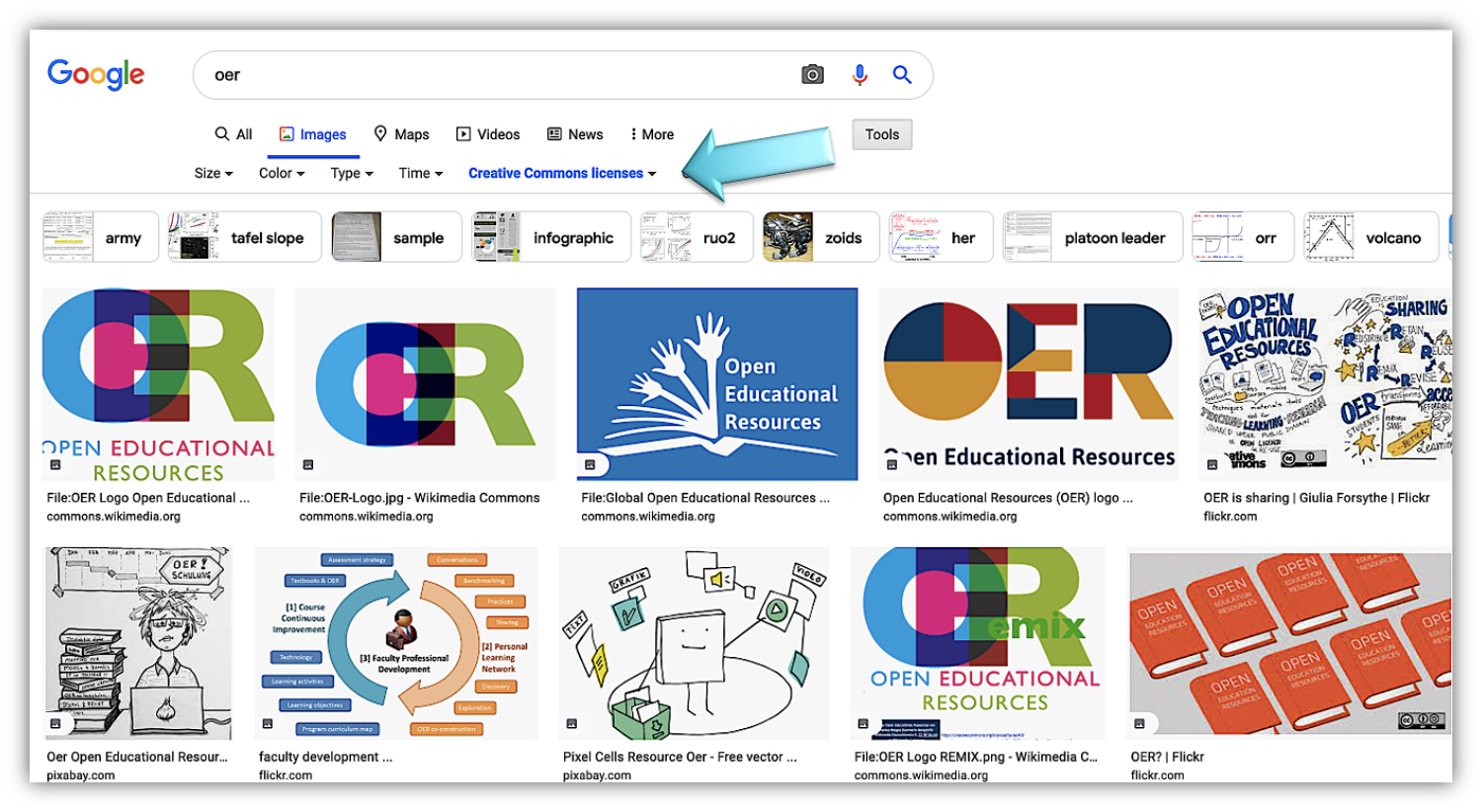
Figure 1. Filtering in google search an image related to OER - Source: Google.com
Another option is to use the “Advanced Search” feature in Google that allows you to use more filters including Usage rights (see the screenshot below, Fig.2).
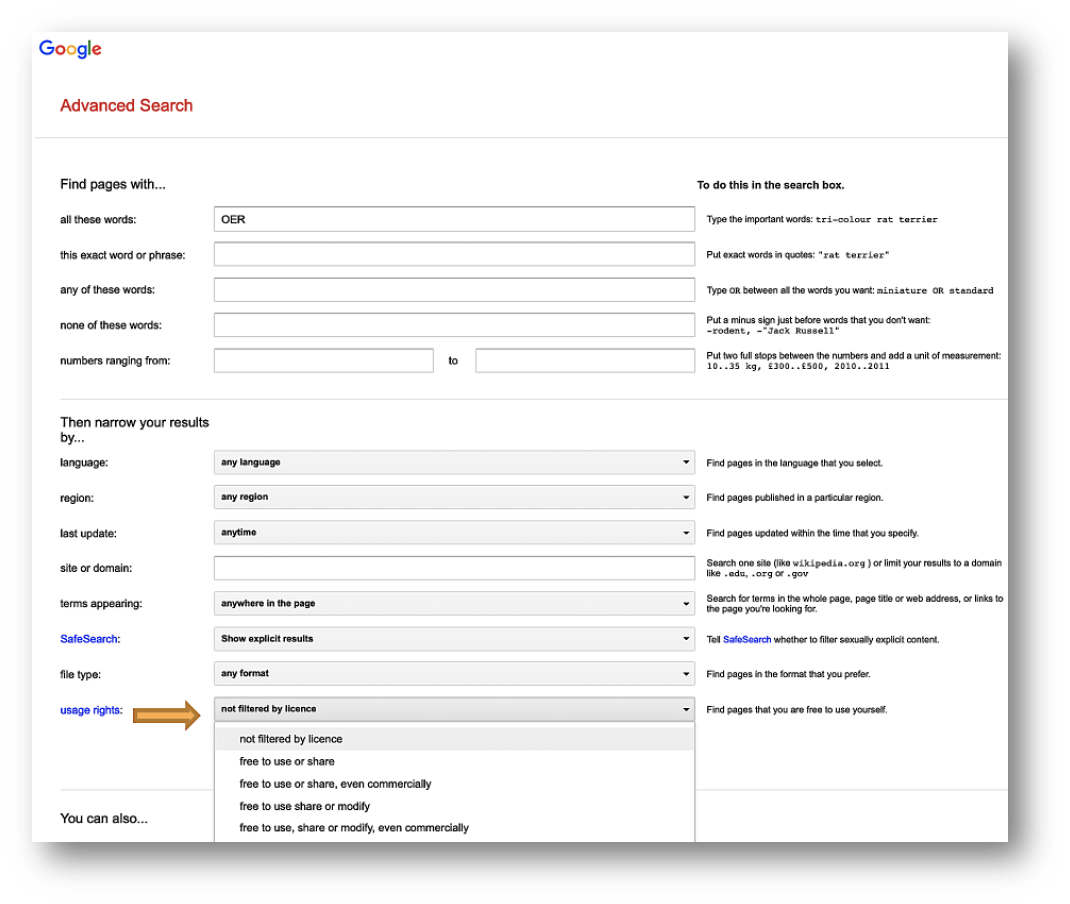
Figure 2. Filtering in Google search - Source: Google.com
- The first thing to do in order to get started is to visit the Google Advanced Search
- In the top field titled "all these words", you enter your keyword or phrase (i.e., OER).
- At the bottom of the search options, you’ll find a field labeled “Usage rights”. The dropdown menu lists different license permissions with varying degrees of openness. You can filter by license and choose the license of your choice.
- Clicking the “Advanced Search” button you will get the search results. In this way it is much easier to filter a variety of different types of materials (i.e., Images, Videos, texts, presentations, games) from the top menu.
- Remember to choose an open license which will give you the most open materials licensed under a CC license (i.e CC BY license 4.0: allows users to freely “use, share or modify, even commercially” the material.
- After the search, don’t forget to look for the license on the content before using it.
- It’s good to remember that each ROER or directory of OER provides a different platform, services and tools and that means that you need to dedicate some time to explore them before you start searching for OERs.
- Keep in mind that there are many social media platforms that use similar filters in order to discover useful material for language learning such as YouTube (see the screenshot below, Fig.3). By clicking on the “filters” option below the search bar (visible after you perform the search) you can apply advanced search options when looking for YouTube videos (i.e., CC licenses, type, and duration).
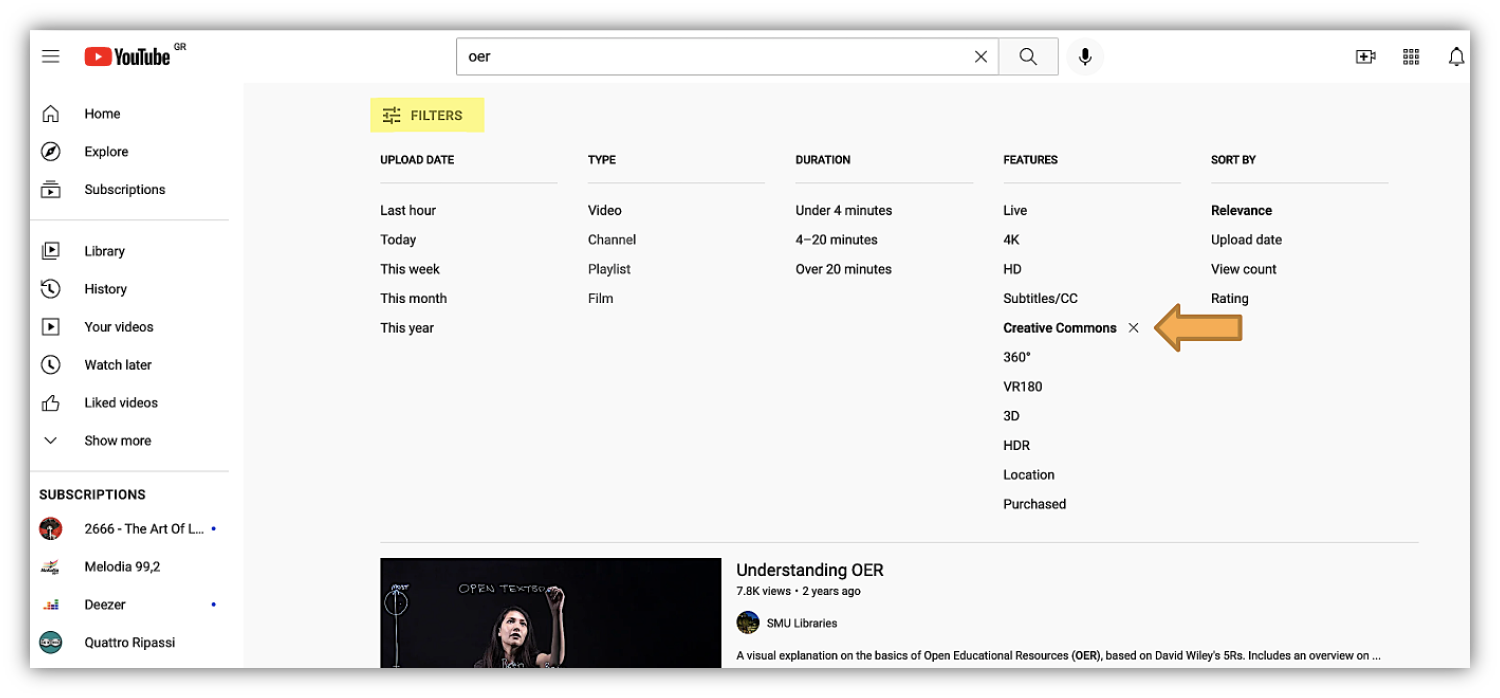
Figure 3. Filtering in YouTube - Source: YouTube.com
Advanced search tips
- Use of OER Metafinders: Metafinders (specialized OER search engines) can help you discover easier language OERs. A well known search engine that searches across numerous OER databases, including those that contain images, textbooks, course modules, supplementary material, and more, is the Mason OER metafinder (MOM). This search engine is described as "Google for OERs" and searches in real-time multiple OER sources with one interface. You can easily filter the results in the sidebar to the left.
- Use of the Directory of Open Access Repositories (OpenDOAR): This online service can help you find easier Open Educational Repositories. OpenDOAR (Directory of Open Access Repositories) is the quality-assured, global Directory of Open Access Repositories. You can search and browse through thousands of registered repositories based on a range of features, such as location, software or type of material.
- Seek out OER repositories that curate language OERs: Some repositories are discipline-specific or have better disciplinary coverage than others. Use the subject headings and filters in the repositories to help you find easier what you need (i.e., OPENLang Network platform, COERLL)
- Search directly in relevant repositories: Merlot and OER Commons are ideal for finding supplementary language learning materials while the Open Textbook Library and BCcampus also include complete textbooks in portable files which in most cases are openly licensed to allow for editing.
➔ Before you create or search for an OER and then evaluate an OER ask yourself, what you want to do with this OER. This is important for the evaluation process.
➔ How do you begin? Check the OER’s licensing status first. If the item appears to be openly licensed (or its status is unclear), evaluate the resource against the proposed criteria. If the license is very restricted the resource is not really an OER.
➔ It’s good to remember that each ROER or directory of OER provides a different platform, services and tools and that means that you need to dedicate some time to explore them before you start searching for OERs.
Learning Activity 1
Visit the “Open Textbook Library”, choose your subject and search for a language textbook of your choice and filter the license to “free to use, share or modify – even commercially”. How easy did you find an appropriate textbook for your teaching and/or learning needs?
Additional Resources
Check this interesting webinar of the Center for Open Educational Resources & Language Learning (COERLL) on discovering authentic texts for language learning! Many useful searching tips are presented by language professionals.
Watch this interesting video on discovering more OER repositories and collections:
References
Perifanou, M., & Economides, A. A. (2021). Discoverability of OER: The case of Language OER. In: Proceedings of the 6th International Conference on Smart Learning Ecosystems and Regional Development (SLERD), 24-25 June. Smart Innovation, Systems and Technologies, Vol. 249, Óscar Mealha et al. (Eds): Ludic, Co-design and Tools Supporting Smart Learning Ecosystems and Smart Education, 978-981-16-3929-6, 511796_1_En, (Chapter 5). DOI: 10.1007/978-981-16-3930-2_5 https://ruomoplus.lib.uom.gr/handle/8000/532
Perifanou, M., & Economides, A. A. (2021). Challenges for finding Language OER: Suggestions to Repositories’ Administrators. In: Proceedings of EUNIS 2021- A New Era of Digital Transformation: Challenges for Higher Education. European University Information Systems organization, 9-11 June. https://ruomoplus.lib.uom.gr/handle/8000/372