6.3 Choosing a license
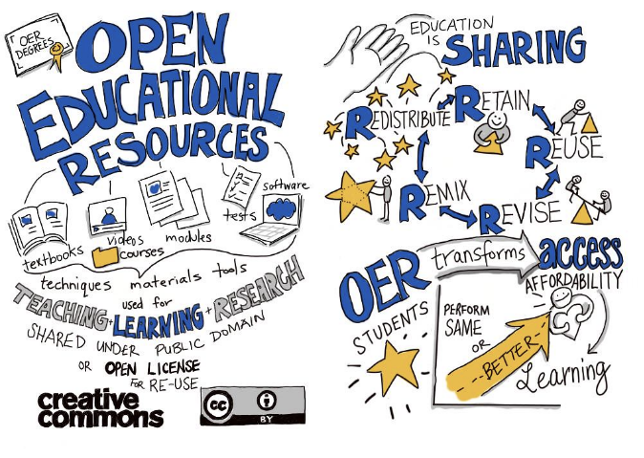
OER is sharing by giulia.forsythe is licensed under CC0 1.0
There are several ways to choose a license for the educational material that you have created or you have found and you wish to attribute its owner. What is important is to know how to select the correct Creative Commons for your resource, how to display the Creative Commons licence on your resources and how to label third-party material in your OER.
You need to understand what each license permits you to do. For example, if you have adapted content under a Share-Alike licence to create your material, you’ll need to use the Share-Alike licence for your material. Also, if you have adapted content under a NonCommercial licence to create your material, you’ll need to use the same or another NonCommercial licence for your content.
Once you select a licence, the next step is to display this licence on your material. Regardless of the medium in which the material appears, specific licence information is required: In fact, there is no standard for attributing open (Creative Commons) licensed content that you use but according to the CC website, the best practice for crediting CC material is through TASL [Best practices for attribution – Creative Commons. March 11, 2021. Available from: https://wiki.creativecommons.org/wiki/best_practices_for_attribution.
- T: Title
- A: Author
- S: Source
- L: License (including the name of the license and a link to the license)
Example: Here is an example of an ideal attribution of a CC-licensed image by Flickr user Lukas Schlagenhauf provided by Creative Commons organisation here:
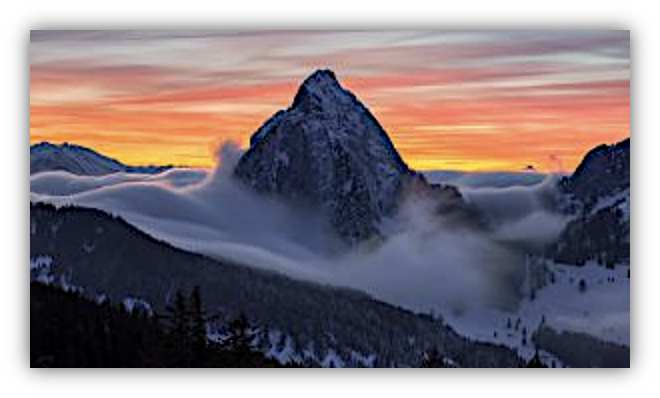
“Furggelen afterglow” by Lukas Schlagenhauf is licensed under CC BY-ND 2.0.
This is an ideal image attribution because it includes the:
- Title: “Furggelen afterglow”
- Author: “Lukas Schlagenhauf“—with a link to their profile page
- Source: “Furggelen afterglow“—with a link to the original photo on Flickr
- License: “CC BY-ND 2.0”—with a link to the license deed
How you attribute authors of the CC works will depend on whether you modify the content, if you create a derivative, if there are multiple sources, etc.
One ideal tool for helping you attribute your language content or the OER you want to use is the “Open Attribution Builder” developed and offered by Open Washington. More concretely, the “Open Attribution Builder” (Figure 4) is an online tool that helps users of CC material to properly credit its owner(s): by filling the form with the work’s details (Title, URL for CC work, Author and website, Organization, and CC license type) the application generates attribution information which can be copied and pasted into other work containing the CC material.
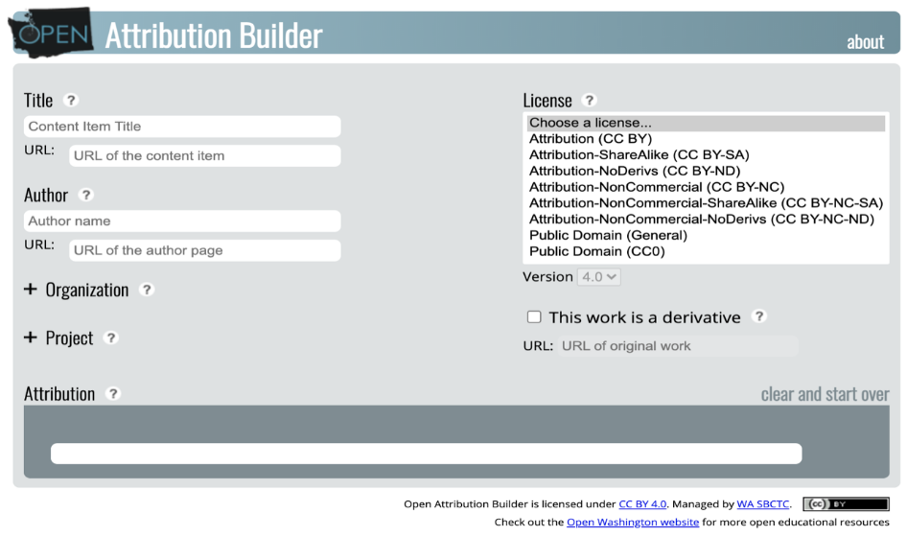
Figure 4. Open Attribution Builder by Open Washington - Source: https://www.openwa.org/attribution-builder
A useful attribution tool that is offered by Wikimedia is the “Wikimedia Attribution Generator”. This is a free tool that helps users correctly attribute images from Wikipedia and Wikimedia Commons that are published under Creative Commons or similar free licenses. You can paste the URL of an image, answer a few questions about how and where the image will be used (e.g. online, in print, modified or unchanged), and the tool automatically generates a properly formatted licence notice containing all required information such as author, title, and licence type. This notice can then be copied and reused to ensure licence compliance.
Another way to get the attribution license for your digital content is to use the Creative Commons license chooser tool. Visit the “Creative Commons.org” website (Figure 5) and use the “License Chooser Tool”. It will automatically generate the CC license icon and the notice based on your needs.
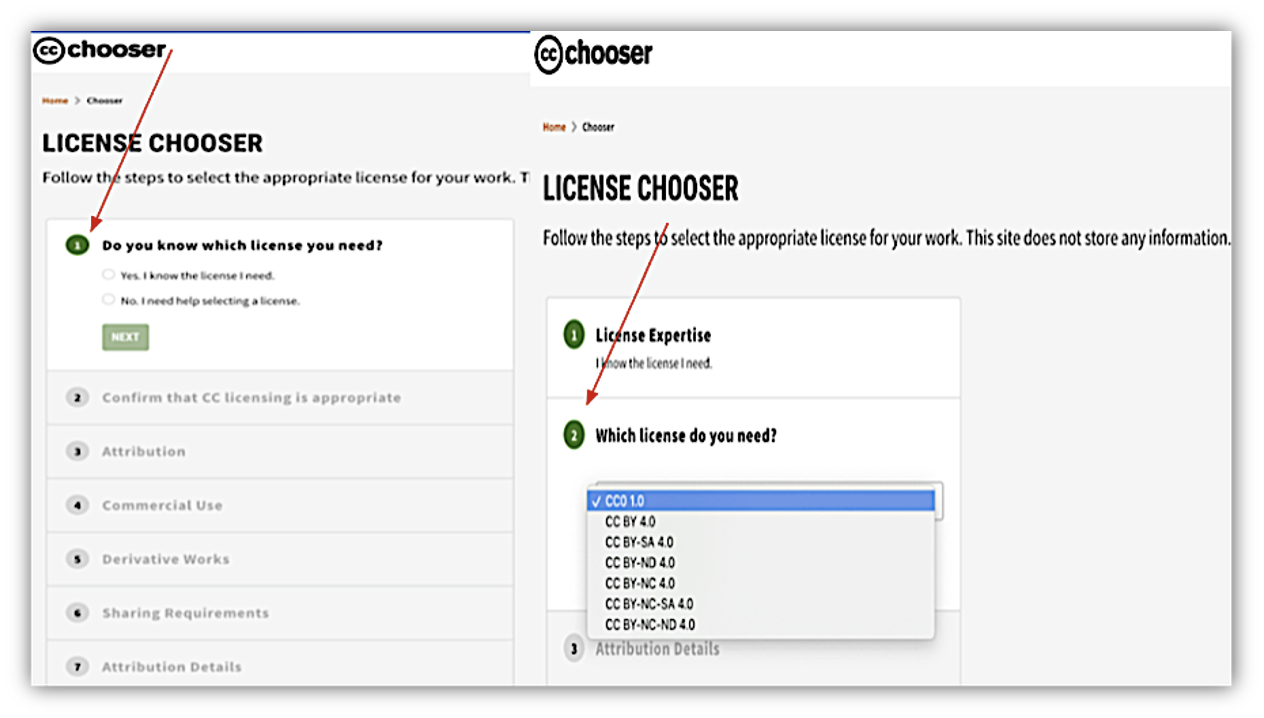
Figure 5. Creative commons’s license chooser tool - Source: https://chooser-beta.creativecommons.org/
The tool generates a license based on the permissions you would like to give to the users and the ones you want to keep. Authors, for instance, can use the CC BY NC license allowing other people to adapt the material, but not be able to sell it. Before choosing a license, authors/creators should have in mind that an OER must be able to exercise all the 5 Rs of open content (Retain, Reuse, Revise, Remix, Redistribute). It is important to note that not all of the licenses meet this criterion.
Figure 6 compares seven license types:
- Public Domain and CC-BY: Allow all five actions without restrictions.
- CC-BY-SA: Allows adaptation and remixing but requires sharing under the same license.
- CC-BY-NC and CC-BY-NC-SA: Restrict commercial use; adaptations must follow the same license for SA versions.
- CC-BY-ND and CC-BY-NC-ND: Do not allow adaptation; use is limited to personal or non-commercial purposes.
Licenses at the top (Public Domain, CC-BY, CC-BY-SA, CC-BY-NC, CC-BY-NC-SA) are suitable for licensing OER because they allow full openness. Licenses with “ND” (No Derivatives) are not suitable for licensing OER because they prohibit adaptation.
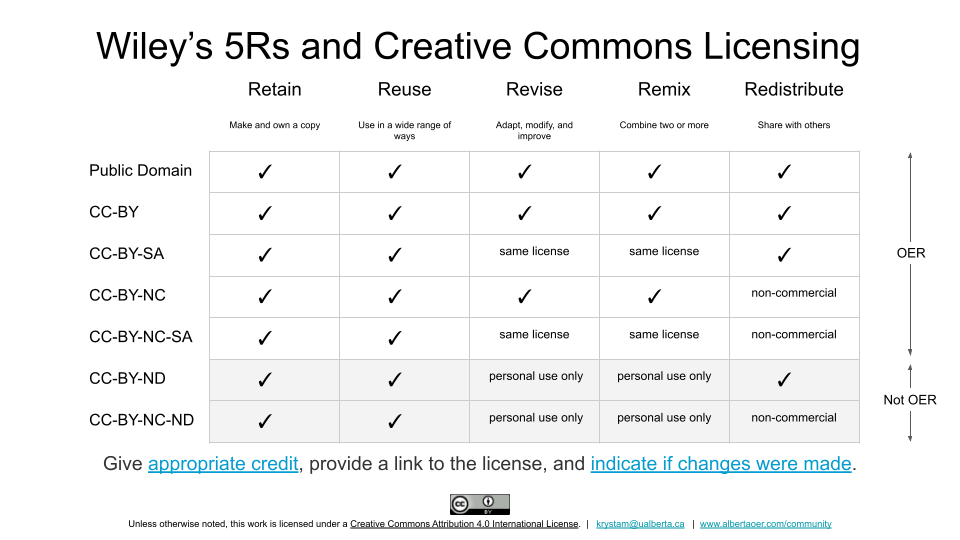
Figure 6. “Wiley's 5Rs and Creative Commons Licensing” by Krysta McNutt is licensed under CC-BY 4.0.
Depending on the type of the work, there are a range of ways you can include the licence details. For instance, if you were licensing a presentation, your licence could be included on a final slide. If you were licensing a film, you would include the licence in your end credits.
More concretely, the attribution is placed in the work as follows:
- Text CC work (e.g., books, worksheets, PowerPoint slides, etc.): the attribution is placed before or after the CC work, or as a footnote at the bottom of the page where it is featured.
- Videos CC work: the attribution is placed when the CC work is played on screen.
- Audio recording CC work: the author’s name is recorded along with the work and the full attribution is placed in text accompanying the CC work where it is being stored (e.g., website, platform, etc.).
In order to properly attribute all the CC materials that you use, it is useful to keep track of it the moment that you use it, as it is quite difficult and time consuming to find the attribution data later. A good way to record all your CC materials is to use a table like Table 3.
| Author/s | Title | Source (e.g., website) | License |
|---|---|---|---|
Table 3. Table to record CC Material (National Copyright Unit) - Source: https://smartcopying.edu.au/how-to-attribute-creative-commons-licensed-materials/
Have a look also at the useful checklist for language teachers/trainers below:
When searching:
- Have you mapped out your needs? Before searching for an OER map out your needs. This will help you figure out the specific elements that you are searching for?
- Have you created a search string? Create a search string for your search. For example, if you wish to focus on pronunciation, start your search with "Greek pronunciation".
When evaluating:
- Is the source of good quality?
- Has the source been peer-reviewed?
- Is the source accurate?
- Does the material add value to your classroom?
- Does the material cover the content you wish to provide to your students?
When using:
- Identify the creative commons license in the material you have identified. Are there any license restrictions?
- Does the material meet your course's/learners' needs?
- Does the material format allow you to remix/adapt the content?
- Can you remix/adapt the content? If the creator allows you to remix/adapt the content you can do so for meeting your learners' needs.
When sharing:
- Have you helped the OER ecosystem grow? Consider sharing your OER for helping the OER community grow.
- Have you added a CC-BY license? When sharing your OER, make sure you add a CC-BY license using the Creative Commons license generator.
Learning Activity 5
Image attribution using the “Wikimedia Attribution Generator”
Visit the “Wikimedia Attribution Generator”, search for an image that you add to the ppt presentation that you are preparing for your language lesson. Copy paste the image of your choice in your ppt presentation and don’t forget to add also the attribution that was generated by the system in rich text format and in the right position. Reflect on the process.
Learning Activity 6
Attributing your own material using the Creative Commons chooser tool
Create your own language audio recording for your language lesson, visit the Creative commons license chooser tool and find your license in order to add it to the website that you are planning to upload the audio recording. Reflect on the process.
Additional resources
You are invited to explore the “Open Washington OER guide to find more about the copyrights, CC licences and the Open Attribution Builder.
Don’t forget to check also the “Creative Commons Information Pack forTeachers and Students” which is constantly updated by NCU and is very useful. The pack explains what CC is, how to find CC material and the best way to attribute CC material.
You can also explore the website https://choosealicense.com/ and find more options for licenses (i.e., MIT license, GNU GPLv3) except for creative commons.
References
Wiki Creative Commons Organisation. Best practices for attribution. Retrieved from https://wiki.creativecommons.org/wiki/best_practices_for_attribution
Learning Activity 7
4th Week Discussion Forum Activity - Attributing the right licence to your OER: In the fourth week's study unit you are advised to post in the Discussion Forum and interact with members of our OER learning community. This task has two parts: In the first part, you are kindly invited to create your own language OER (i.e. a test, an exercise, a lesson plan, a ppt presentation of your lesson, etc), and find a license that you would like to attribute to your material. In the second part, you are invited to upload your language OER. Don’t forget to give feedback to the other members of our language OER community!