

4.4.2 How can you reduce your carbon footprint?
There are many websites that provide information and inspiration for home eco-refurbishment, lower-carbon transport options, and other green technologies and lifestyle changes. Some give the cost of different actions, available subsidies and the time to pay back any expenditure involved. There are also apps available to download that aim to make it easier and more convenient for users to reduce their impact on the environment – for example, ‘Too Good To Go’, which aims to reduce food waste.
You will now return to the carbon calculator to explore how you might be able to reduce your carbon footprint to a target level.
Activity 8 Reducing your carbon footprint
Use the carbon calculator to explore how to reduce your carbon footprint to your chosen target by following the steps below.
- Open the carbon calculator [Tip: hold Ctrl and click a link to open it in a new tab. (Hide tip)] .
- With the calculator running go to the Summary tab and open your ‘existing’ footprint from Activity 7. ).
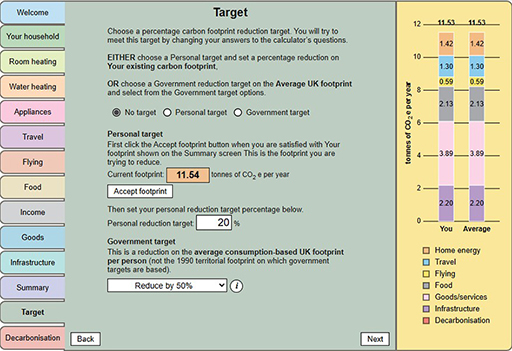
- On the Target screen, select either a Personal OR a Government reduction target.
- Personal target: first select the ‘Accept footprint’ button to set Your existing footprint value. Your footprint on the bar chart and Summary screen will appear in the box. Then in the box below type in your chosen percentage reduction target.
- Government targets: select a percentage reduction (50%, 65% or 75%) on the UK Average consumption-based footprint.
- Use the calculator to explore how your existing footprint might be reduced to your chosen target level. Do this by selecting the calculator’s tabs and changing answers to the questions.
- When you are satisfied that you have reached – or done your best to reach – your target, save your reduced footprint using a different name (e.g. ReducedFootprint1)
- FAQs can be found here.
If you haven’t managed to reach your target, you have the option of further reducing your footprint via emission reduction measures that could be paid towards by you but are undertaken by government or others in Activity 13 in Section 5.