
Q1. How To Choose the Right Technology?
 LEARNING OUTCOME
By the end of this section, you practiced selecting a suitable digital tool to support your learning objectives.
 LISTEN
In the following podcast (2.54min), English and Literature Teacher Stella Namwase from Wanyange girls SS in Jinja District explains how to choose digital tools based on learning goals, classroom practice, and school context—not trends. Listeners learn to look at learning effect, ease of use, added value, and ethics when using technology in class. The podcast also shares practical tips for low-resource settings, sustainability, privacy, and making smart, realistic choices.
 WATCH
WATCH
In the following video by San Bernardino City Unified School District (SBCUSD) a teacher demonstrates how to put theory in to practice. She explains how she chooses technology to match her lesson objectives. For collaboration and research, she uses Google Docs, Drive, (See TEL 1.0) and Hyperdocs, guiding students to resources that she pre-selected. She explains which tool she uses to support skill-building, helping her make technology purposeful and aligned with the learning objectives she wants to achieve.
For easier viewing on mobile, click “Watch on YouTube.”
 READ
READ
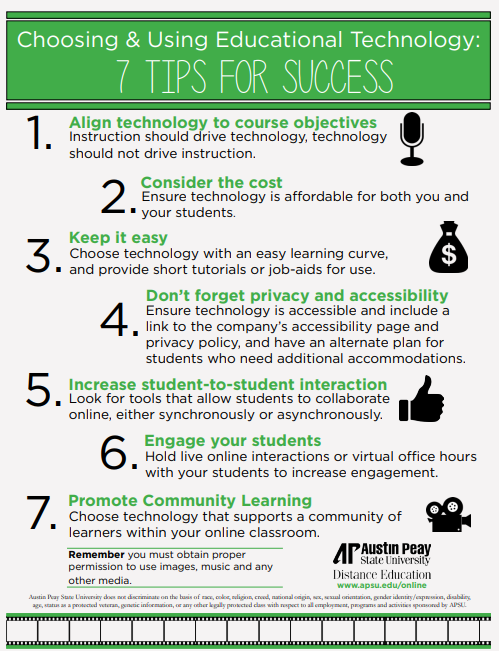
Ready to do the same as your colleagues? Consult this checklist by Austin Peay for aligning technology with objectives and ensuring accessibility and ease for students.
 AI-INTEGRATION
How can AI support teachers to choose digital tools wisely?
AI can act as a thinking partner to help teachers reflect on digital tools instead of following trends. AI does not decide for you, but helps you make informed and intentional choices, especially in low-resource settings.
👉🏾 AI for tool suggestions by context
Example: “Suggest three digital tools to check student understanding in a rural secondary school with limited internet. Include free or open-source options and one limitation for each.”
👉🏾 AI for privacy and ethics checks
Example: “Is Padlet safe for student data? Suggest a more privacy-friendly alternative for student brainstorming in a low-income school.”
👉🏾 AI for low-resource school settings
Example: “Recommend tools that work offline or with low bandwidth for classroom quizzes and feedback in a school with one laptop and a projector.”
Click Next to practice selecting a digital tool to support your learning objectives.