
How to Upload a Country Data File
Download a PDF version of this how-to guide here:
()
Contents of a Country Data File
A country data file is an Excel file that contains all of the data required to run the UNI-CGE model and analyze a country. Figure 1 shows the worksheets in a country data file.
Figure 1. Worksheets in a country data file
- The first three worksheets are technical (Index, Sets, Maps). The index worksheet directs the CGE model to cells containing the data needed to run the model. The sets worksheet defines all sets in the CGE model. Mapping links one set to another – in our case, it links two sets that describe factors. Do not change anything in these worksheets!
- The SAM-XXX worksheet contains the Social Accounting Matrix (SAM). The three letters – XXX – are the three-letter country code. In our example, SAM-SEN is the SAM for Senegal, whose country code is SEN. SAMS for the UNI-CGE model are aggregations of the global database developed by the Global Trade Analysis Project GTAP). Do not change anything in the SAM worksheet!
- There are three elasticity worksheets. The first contains the elasticities used in the Linear Expenditure System (LES), which is used by the UNI-CGE model to describe consumer demand. The LES-CD worksheet contains elasticities that transform LES demand into Cobb-Douglas. This worksheet is for your reference only; you can use these values in the LES worksheet if you prefer to have a Cobb-Douglas utility function in your model. Worksheet ELAS contains all the other elasticities used in the model. These elasticity values are general, commonly used values in CGE models. You can change the elasticities on the LES and ELAS worksheets if you have better information on elasticities or if you want to change elasticities to see how results may change.
- The last three worksheets report how the GTAP global database has been aggregated into the 6-sector, 3-factor SAM. This descriptive information creates a record that you may find useful.
Upload a Country Data File into the Uni-CGE Model
A. Locate the Country Data Files
All country datafiles are located in our classroom’s Database Library in Module 6. Our library of country data files is continually expanding. A subset of country files are also included in the UNI-CGE vXX.zip file.
Our database naming convention is SAM-XXX.xlsx, where XXX is the 3-letter country code from the ISO 3166 standards. For example, the country data file for India is named: SAM-IND.
An exception is the name of the U.S. SAM used for demonstration in this course. It is named : SAM-USA333.
B. Load the Country Data File into the Model
The UNI-CGE model is directed to the selected country data file using GAMS’ connect command. Search for the term: file: (figure 2).
Figure 2: Load the country file .
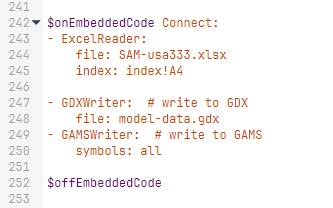
The example in figure 2 selected SAM-USA333.xlsx. If you prefer to use a different country data file, edit the country code to select a different country file. For example, if you want to select the Nigeria data file, then the command would be:
File: SAM-NGA.xlsx
where NGA is the 3-digit country code for Nigeria.
IMPORTANT: The command is sensitive to spacing. We recommend that if you replace the country, you replace “usa333” with – for example – NGA, without otherwise changing any spacing, dashes or periods.
Copyright Cornerstone CGE cc 4.0 BY-NC-SA